


Featured
New
DesignEvo – Free Logo Maker
- https://www.designevo.com/
- June 4, 2026
In today’s fast-moving digital design ecosystem, AI-powered creative tools are reshaping how individuals and businesses create visual content. One of the most practical and widely adopted innovations in this space is Canva AI Photo Editor, a feature within the popular design platform Canva.
Canva itself is a globally recognized visual design SaaS platform used by millions of creators, marketers, educators, and businesses. Over time, Canva has evolved from a simple drag-and-drop design tool into a full AI-powered creative suite. Among its standout AI features, Magic Edit has gained significant attention for making professional-level image editing accessible to non-designers.
Unlike traditional editing software that requires technical expertise (like Photoshop), Canva AI Photo Editor allows users to modify images using simple text prompts—bridging the gap between creativity and AI automation.
This review explores Canva AI Photo Editor in depth, covering how it works, its capabilities, real-world use cases, limitations, pricing, and whether it is worth integrating into your workflow.
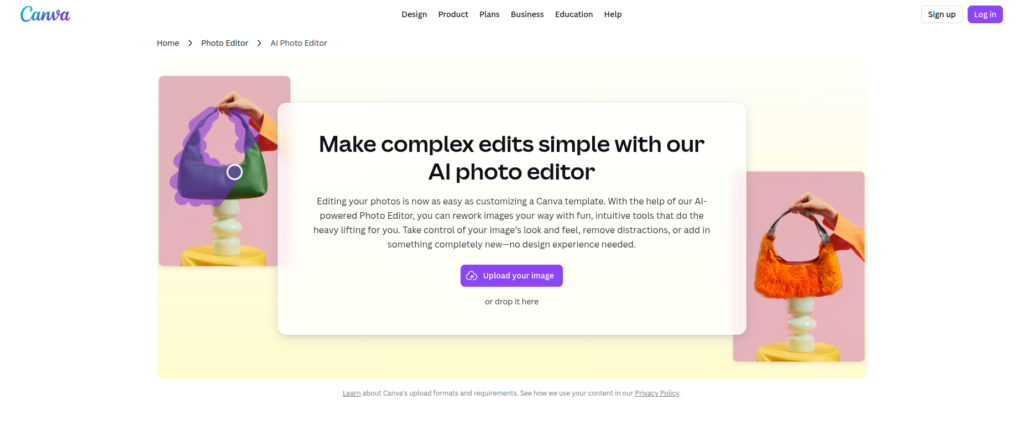
Canva AI Photo Editor is an AI-powered image editing feature that allows users to replace, add, or modify elements within an image using natural language prompts.
In simple terms:
You upload an image → select an area → describe what you want → AI edits it instantly.
For example:
The key innovation is that users do not need manual editing skills. Instead of layers, brushes, or masking tools, you simply “describe” the change.
Traditional image editing tools often require:
Canva AI Photo Editor solves this by:
Canva AI Photo Editor is designed to be intuitive and beginner-friendly. Here’s a step-by-step breakdown of how it works:
Log into Canva and open an existing design or upload a new image.
Click on the image and choose the “Magic Edit” option from the editing toolbar.
Use a brush tool to select the part of the image you want to modify.
Example:
Describe what you want to replace or add.
Examples:
Canva’s AI processes your request and generates multiple variations.
You can:
This workflow eliminates the need for manual photo manipulation and dramatically speeds up content creation.
Canva AI Photo Editor comes with several powerful AI-driven capabilities:
Replace objects in images seamlessly without breaking realism.
Example:
Easily transform backgrounds without complex editing.
Add new elements that blend naturally into the image.
No technical tools required—just describe what you want.
This removes dependency on:
Magic Edit generates multiple versions of your request, allowing creative flexibility.
Works directly inside Canva’s design ecosystem:
Edits are generated in seconds, making it ideal for fast-paced content creation workflows.
Canva AI Photo Editor is widely used across industries. Here’s how different user groups benefit:
Example:
A startup can replace product backgrounds to create multiple ad variations for A/B testing.
Example:
A marketer can turn a single product image into 10 different ad creatives in minutes.
While not a coding tool, developers use it for:
Example:
A teacher can quickly modify educational diagrams or illustrations for lessons.
Tasks that once took hours can now be done in seconds.
Even beginners can create professional visuals.
Reduces dependency on expensive designers or software.
Users can experiment freely without technical limitations.
Ideal for social media, marketing, and e-commerce workflows.
No need to switch between multiple tools.
To maintain transparency (important for E-E-A-T), Canva AI Photo Editor does have limitations:
Highly detailed or technical edits may not always be perfect.
Different prompts can produce inconsistent results.
Requires stable internet connection for processing.
Advanced AI features may be limited depending on subscription tier.
While powerful, it does not yet replace advanced professional editing software.
Canva AI Photo Editor is part of Canva’s AI feature suite and is available depending on subscription type.
Pricing may vary by region, but Canva Pro is generally the most popular option for individuals and small businesses.
Its biggest strength is workflow simplicity + integration, not just raw AI power.
This tool is ideal for:
If your work involves frequent visual content creation but limited design expertise, Canva AI Photo Editor is extremely valuable.
Canva follows standard industry practices for data protection:
However, users should always avoid uploading sensitive or confidential images unless necessary, as AI processing typically involves cloud-based rendering.
Canva AI Photo Editor is one of the most practical AI-powered design tools available today, especially for non-designers and content-driven professionals.
It does not aim to replace advanced editing tools like Photoshop entirely. Instead, it focuses on making everyday image editing faster, simpler, and more accessible.
If your goal is fast, high-quality visual content creation without technical complexity, Canva AI Photo Editor is absolutely worth using.
There are no reviews yet.


Get the latest AI tools and trends delivered to your inbox. Subscribe to the AI Tool Mapper newsletter for curated AI updates.
AI Tool Mapper is a curated AI tools directory that helps users discover, compare, and choose the best artificial intelligence tools for work, business, and creativity.
© 2026 AI Tool Mapper. All rights reserved