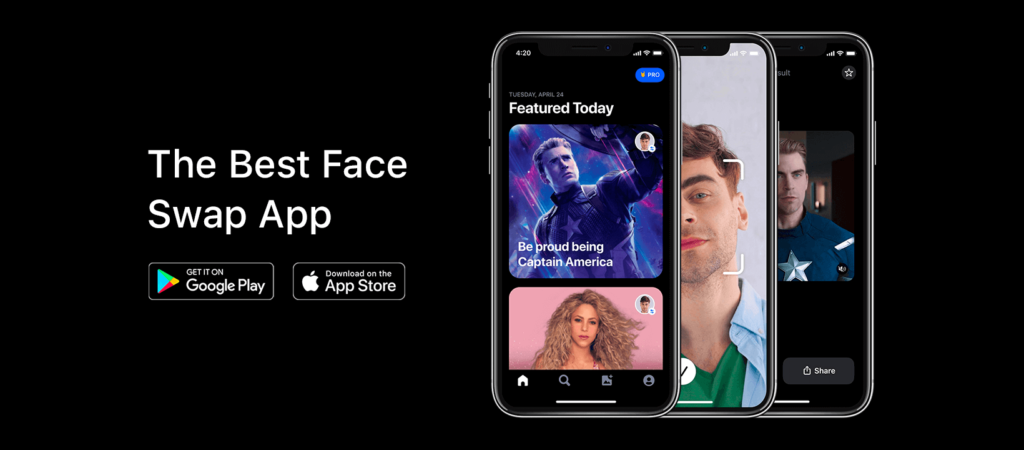
In today’s fast-evolving AI ecosystem, synthetic media tools are reshaping how people create, edit, and share digital content. One of the most recognizable names in this space is Reface AI, a viral AI-powered face-swapping application that gained global attention for its ability to place users’ faces into videos, GIFs, and memes with impressive realism.
Originally developed by a Ukrainian tech company, Reface has grown into a widely used AI entertainment platform with millions of downloads worldwide. It stands at the intersection of computer vision, generative AI, and mobile content creation, making it one of the most mainstream examples of AI-driven media personalization.
In this review, we will break down Reface AI in detail—how it works, its features, real-world use cases, pricing, limitations, and whether it is actually worth using in 2026.
What Is Reface AI?
Reface AI is a mobile-first AI face-swapping and content generation tool that allows users to replace faces in photos, GIFs, and videos using deep learning technology.
At its core, the platform solves a simple but powerful problem:
How can users instantly create entertaining, personalized video content without editing skills?
Instead of requiring complex software like Adobe After Effects or Photoshop, Reface automates the entire process using AI models trained on facial mapping, motion tracking, and image synthesis.
In simple terms:
Reface AI lets you:
- Put your face into movies or viral clips
- Create realistic face swaps in seconds
- Generate humorous or cinematic content for social media
It is primarily designed for entertainment, social sharing, and creative experimentation rather than professional video production.
How Reface AI Works
Reface AI uses a combination of deepfake-style neural networks and generative adversarial networks (GANs) to map facial features and blend them into target media.
Here’s a simplified step-by-step breakdown:
Step 1: Upload or Capture Your Face
Users either:
- Take a selfie directly in the app
- Upload an existing image
The AI scans facial landmarks such as:
- Eyes
- Jawline
- Nose structure
- Facial proportions
Step 2: Choose Content Template
Reface provides a library of:
- Movie clips
- Viral GIFs
- Music videos
- Memes
- AI-generated avatars
Step 3: AI Processing
The system:
- Matches facial geometry
- Analyzes lighting and motion
- Aligns expressions frame-by-frame
Step 4: Face Swap Generation
The AI generates a realistic output where:
- Your face replaces the original actor
- Facial expressions are preserved
- Motion is synchronized
Step 5: Download or Share
Users can:
- Save the video
- Share directly to social media platforms like Instagram, TikTok, and WhatsApp
Core Features & Capabilities
Reface AI is not just a face-swapping tool—it is a full AI-powered media creation suite.
1. AI Face Swapping
- Swap faces in videos and GIFs
- High-speed rendering
- Realistic expression mapping
2. AI Avatar Creation
- Generate stylized digital avatars
- Cartoon, cinematic, or realistic modes
3. Video Face Integration
- Insert your face into short video clips
- Supports trending media templates
4. GIF Personalization
- Turn memes into personalized content
- Instant preview and export
5. AI Photo Animation
- Bring static images to life
- Add motion effects and facial expressions
6. Content Library
- Thousands of pre-made templates
- Regularly updated trending clips
7. Social Sharing Tools
- One-click sharing to social platforms
- Optimized formats for mobile viewing
8. Face Enhancement Engine
- Improves facial clarity
- Adjusts lighting and skin tone for realism
Real-World Use Cases
Although Reface AI is primarily entertainment-focused, it is used across multiple user categories.
1. Businesses & Startups
- Create viral marketing campaigns
- Produce engaging social media ads
- Experiment with personalized brand storytelling
Example: A startup using Reface to place its founder’s face into trending movie clips for promotional reels.
2. Marketers & Content Creators
- Generate high-engagement TikTok content
- Create meme-based marketing strategies
- Boost audience interaction with humor-driven content
3. Developers & Technical Users
- Study AI face-swapping models
- Experiment with synthetic media APIs (where available)
- Understand generative adversarial networks in real-world applications
4. Students & Educators
- Make presentations more engaging
- Use AI visuals for storytelling projects
- Demonstrate AI concepts in classrooms
5. Freelancers & Solopreneurs
- Create personalized client content
- Offer social media content packages
- Build viral branding campaigns for small businesses
Key Benefits
Reface AI delivers several practical advantages:
- Fast content creation – videos generated in seconds
- No editing skills required – fully automated workflow
- High engagement potential – ideal for social media virality
- Creative freedom – experiment with identity-based content
- Mobile convenience – fully optimized for smartphones
- Low barrier to entry – easy for beginners
Limitations & Things to Consider
Despite its popularity, Reface AI has some clear limitations:
- Limited professional use – not suitable for serious video production
- Template dependency – creativity is restricted to available clips
- Watermarks in free version
- Privacy concerns – face data processing may raise ethical questions
- Requires internet connection
- Subscription needed for full features
From an E-E-A-T perspective, it’s important to understand that Reface is designed for entertainment, not professional-grade filmmaking.
Pricing & Plans
Reface AI operates on a freemium model:
Free Plan
- Basic face swap features
- Limited templates
- Watermarked exports
Premium Subscription
- Full template library
- HD exports
- Faster processing
- No watermark
- Priority AI rendering
Enterprise / Licensing (limited availability)
- Custom integrations
- Brand usage rights
- Bulk content generation tools
Pricing may vary by region and platform (iOS/Android).
Pros & Cons
Pros
- Extremely easy to use
- High-quality face swap results
- Large content library
- Fun and highly shareable outputs
- Regular updates with trending content
Cons
- Not suitable for professional editing
- Free version is heavily limited
- Ethical concerns around deepfake usage
- Requires stable internet connection
- Output quality depends on source image
Reface AI vs Similar AI Tools
When compared with other AI face-swapping tools and generative apps:
- Reface focuses on mobile entertainment and virality
- Some competitors focus on professional deepfake editing or AI video generation
- Reface is faster and more user-friendly but less customizable
Key differentiator:
Reface AI prioritizes instant fun content creation over professional control and editing depth.
Who Should Use Reface AI?
Reface AI is ideal for:
- Social media users who enjoy viral content
- Influencers creating engaging short videos
- Marketers experimenting with meme marketing
- Students exploring AI creativity tools
- Casual users looking for entertainment
It is NOT ideal for:
- Film production professionals
- Serious video editors
- Users requiring advanced AI customization
Privacy, Security & Data Handling
Reface AI processes facial data to generate outputs, which naturally raises privacy considerations.
Key points:
- Facial images are processed using AI models
- Users should review app permissions carefully
- The company states it follows standard data protection practices
- Temporary data processing is used for rendering outputs
As with any face-based AI tool, users should avoid uploading sensitive or private images.
Final Verdict
Reface AI remains one of the most recognizable consumer AI apps in the world for face swapping and synthetic media creation.
It is not designed to replace professional editing tools, but rather to make AI-powered entertainment accessible to everyone.
Overall assessment:
- Best for fun, viral, and social content
- Extremely easy for beginners
- Limited for professional workflows
- Strong innovation in mobile AI creativity
Final takeaway:
If your goal is to create quick, entertaining, and shareable AI-generated content, Reface AI is still one of the most effective tools in its category.