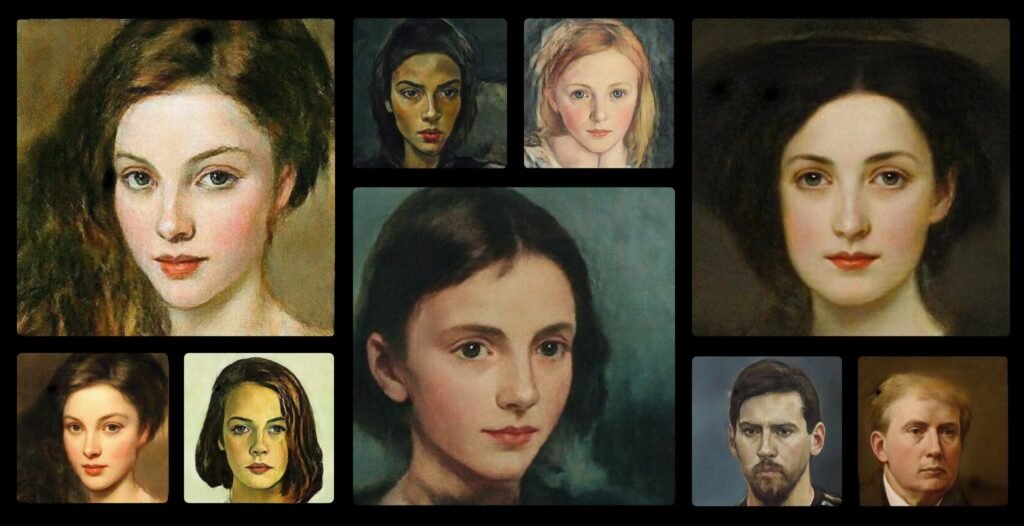
Tools that combine simplicity and originality are becoming increasingly popular in the rapidly developing field of AI-generated art. One such tool is PortraitAI, an AI-powered portrait generator created by PortraitAI OÜ, a business dedicated to producing interesting, user-friendly AI experiences.
PortraitAI stands out for a very specific reason: it transforms ordinary selfies into stunning 18th-century-style classical portraits using artificial intelligence. While many AI art tools aim for hyper-realism or modern styles, PortraitAI leans into historical aesthetics—making it both unique and instantly recognizable.
In an era where personalization, visual storytelling, and social media identity matter more than ever, PortraitAI taps into a niche that resonates with casual users, creators, and even marketers.
What Is PortraitAI?
PortraitAI is a web-based AI tool that converts your uploaded photos—typically selfies—into AI-generated classical portraits inspired by European paintings from the 1700s and 1800s.
In simple terms:
You upload a photo → AI processes it → You get a vintage-style portrait.
The Problem It Solves
Before tools like PortraitAI:
- Creating artistic portraits required professional artists or expensive software
- Editing images into historical styles was time-consuming
- Most people lacked the skills to produce stylized artwork
PortraitAI removes these barriers by:
- Automating artistic transformation
- Delivering results in seconds
- Making art accessible to non-designers
Who It Helps
- Social media users wanting unique profile pictures
- Content creators looking for artistic visuals
- Individuals curious about AI-generated identity transformations
- Designers exploring AI-based creativity
How PortraitAI Works
PortraitAI is designed for simplicity. You don’t need any design or technical background to get started.
Step-by-Step Guide
- Visit the Website
Go to the official PortraitAI platform via browser. - Upload Your Photo
- Use a clear, front-facing selfie
- Avoid group photos for best results
- AI Processing Begins
The tool uses deep learning models trained on historical portrait datasets. - Wait for Rendering
Processing typically takes 10–30 seconds depending on server load. - Download Your Portrait
- Preview results
- Download high-resolution image
Tips for Best Results
- Use neutral lighting
- Avoid heavy filters
- Keep facial features clearly visible
- Use high-resolution images
Core Features & Capabilities
PortraitAI focuses on doing one thing exceptionally well—creating artistic portraits.
🎨 AI-Powered Portrait Generation
- Converts selfies into classical art styles
- Inspired by Renaissance and Enlightenment-era paintings
- Maintains facial structure while altering artistic tone
Example:
A casual smartphone selfie becomes a museum-style oil painting portrait.
🧠 Deep Learning-Based Style Transfer
- Uses trained neural networks
- Learns patterns from historical art datasets
- Applies textures, lighting, and brush effects
⚡ Fast Processing
- Results generated within seconds
- No need for rendering software or manual editing
📱 Mobile-Friendly Experience
- Works smoothly on mobile browsers
- Ideal for quick social sharing
🖼️ High-Resolution Output
- Downloadable images suitable for:
- Profile pictures
- Posters
- Creative content
🔄 Repeatable Variations
- Upload different images for varied outputs
- Experiment with angles, expressions, and lighting
Real-World Use Cases
🏢 Businesses & Startups
- Creative branding visuals
- Team profile images with a unique twist
- Marketing campaigns with artistic storytelling
📢 Marketers & Content Creators
- Eye-catching social media posts
- Unique thumbnails and profile pictures
- Viral content creation (AI portraits trend well)
💻 Developers & Technical Users
- Inspiration for AI model training
- Testing style transfer capabilities
- Exploring generative AI outputs
🎓 Students & Educators
- Teaching AI concepts like GANs and neural networks
- Creative classroom projects
- Digital art experimentation
💼 Freelancers & Solopreneurs
- Portfolio enhancement
- Personalized branding visuals
- Client deliverables (creative edits)
Key Benefits
⏱️ Time Efficiency
- No manual editing required
- Instant transformation compared to hours of design work
💡 Creativity Boost
- Encourages experimentation
- Offers artistic results without skill barriers
📈 Scalability
- Generate multiple portraits quickly
- Useful for bulk content creation
🎯 Accessibility
- Beginner-friendly
- No software installation needed
🎨 Unique Aesthetic Output
- Distinct historical art style
- Differentiates from modern AI art tools
Limitations & Things to Consider
To maintain transparency and trust, here are some realistic limitations:
⚠️ Limited Style Variety
- Focuses mainly on classical European portrait styles
- Not ideal for users seeking diverse art styles
🧍 Face-Centric Tool
- Works best with single-person portraits
- Group photos often produce inconsistent results
🎭 Output Accuracy Varies
- Some portraits may:
- Distort facial features
- Misinterpret expressions
📶 Requires Internet Access
🔒 Privacy Concerns
- Users must upload personal images
- Always review data usage policies before uploading sensitive photos
Pricing & Plans
PortraitAI follows a Freemium model.
🆓 Free Plan
- Basic portrait generation
- Limited usage
- Watermarked or lower resolution outputs (in some cases)
💰 Paid Plan (If Available)
- Higher resolution downloads
- Faster processing
- No watermark
Pricing may vary over time, so always check the official website for the latest updates.
Pros & Cons
✅ Pros
- Extremely easy to use
- Fast AI processing
- Unique classical portrait style
- No design skills required
- Accessible via browser
❌ Cons
- Limited artistic styles
- Occasional inaccuracies in output
- Requires image upload (privacy consideration)
- Not suitable for professional-grade design needs
PortraitAI vs Similar AI Tools
| Feature | PortraitAI | Other AI Art Tools |
| Style Focus | Classical portraits | Multiple styles |
| Ease of Use | Very high | Moderate |
| Customization | Low | High |
| Speed | Fast | Varies |
| Output Type | Portrait-focused | General art |
Key Differentiator:
PortraitAI is specialized, not generalized. While tools like Midjourney or DALL·E offer broader creativity, PortraitAI excels in historical portrait transformation.
Who Should Use PortraitAI?
PortraitAI is ideal for:
- Social media enthusiasts
- Casual AI art users
- Content creators
- Students learning AI
- Freelancers building personal brands
Not Ideal For:
- Professional designers needing precision
- Users looking for multiple art styles
- Complex image editing workflows
Privacy, Security & Data Handling
PortraitAI requires users to upload images, which raises valid privacy considerations.
Key Points:
- Images are processed on remote servers
- Users should avoid uploading sensitive or confidential photos
- Always review the tool’s privacy policy
Best Practice:
Use non-sensitive images and avoid personal data exposure.
Final Verdict
PortraitAI is a simple yet powerful niche AI tool that delivers exactly what it promises—beautiful, classical-style portraits generated from your selfies.
It’s not trying to compete with advanced AI art platforms, and that’s actually its strength. Instead, it focuses on:
- Speed
- Simplicity
- A unique artistic identity
Is It Worth Using?
Yes—if you:
- Want quick, artistic portraits
- Enjoy experimenting with AI visuals
- Need creative social media content
Maybe not—if you:
- Require advanced customization
- Need professional design precision
Overall, PortraitAI is a fun, accessible, and creatively satisfying tool that demonstrates how AI can bring art closer to everyday users.