Go Back
Report Abuse

Remini AI – AI Photo Enhancer, Portrait Tool

Remini AI
Remini AI
Remini AI
Remini AI
Remini AI
Remini AI

Description

Visual quality is crucial in the content-driven digital world of today. Blurry or low-resolution photos can damage your brand’s trust, whether you’re a social media developer, marketer, or company owner. Remini AI can help with it.

Developed by Bending Spoons, Remini AI has rapidly become one of the most widely used AI-powered photo enhancement tools globally. With millions of downloads across mobile platforms, it leverages advanced deep learning models to transform low-quality visuals into high-definition images in seconds.

Unlike traditional photo editors that require manual adjustments, Remini AI automates the enhancement process—making it accessible even for beginners while still offering value for professionals.

What Is Remini AI?

Remini AI is an AI-powered image enhancement and restoration tool designed to improve the quality of photos and videos. It primarily focuses on:

  • Enhancing facial details
  • Upscaling low-resolution images
  • Restoring old or damaged photos
  • Improving video clarity

At its core, Remini solves a very common problem: turning poor-quality visuals into sharp, professional-grade content without needing advanced editing skills.

For example:

  • A blurry selfie becomes Instagram-ready
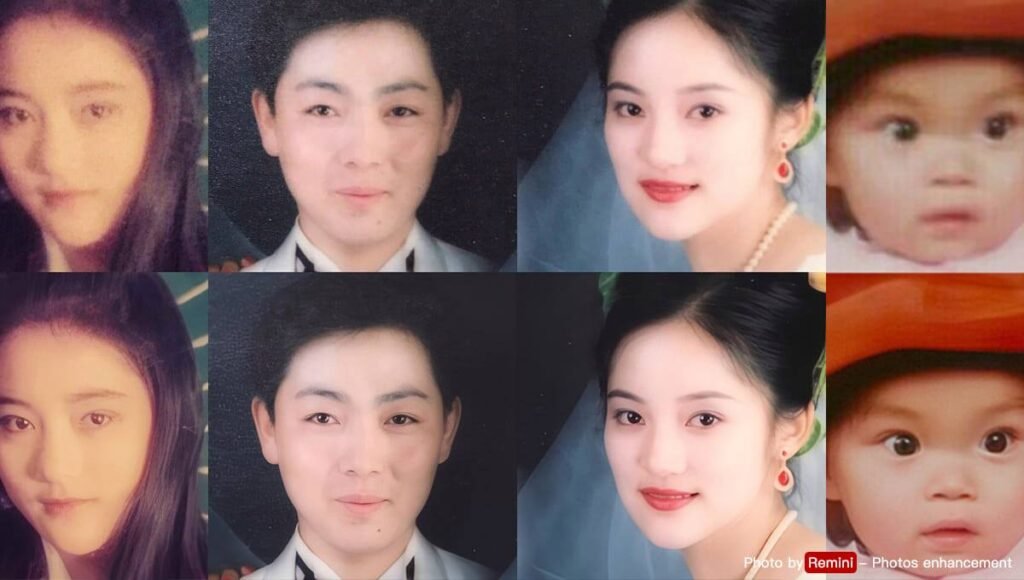
  • An old family photo gets restored with realistic details
  • A pixelated video clip becomes clearer and more watchable

How Remini AI Works

Remini uses deep neural networks trained on massive datasets of human faces and images. These models learn patterns like skin texture, facial structure, and lighting to reconstruct missing details.

Step-by-Step Usage

  1. Download the App
    • Available on iOS and Android platforms.
  2. Upload Your Image or Video
    • Select from your gallery or capture directly.
  3. Choose Enhancement Mode
    • Options include face enhancement, video enhancement, or photo restoration.
  4. AI Processing
    • The system analyzes and enhances the image automatically.
  5. Preview & Adjust
    • Compare before/after results.
  6. Download or Share
    • Save in high resolution or post directly to social platforms.

No technical expertise is required—Remini is designed for one-click transformation.

Core Features & Capabilities

Remini AI offers a wide range of features tailored for both casual users and professionals.

1. AI Photo Enhancement

  • Converts blurry, low-resolution images into HD
  • Enhances facial features with precision

Example: Turning a grainy selfie into a sharp portrait suitable for LinkedIn.

2. Face Enhancement Technology

  • Specially optimized for human faces
  • Adds realistic skin texture and details

Use Case: Improving profile pictures for dating apps or professional portfolios.

3. Old Photo Restoration

  • Repairs scratches, noise, and faded colors
  • Reconstructs missing details

Example: Reviving decades-old family photos with stunning clarity.

4. Video Enhancement

  • Improves video resolution and sharpness
  • Reduces noise and enhances frame quality

Use Case: Upgrading old video clips for YouTube or presentations.

5. AI Portrait Generation

  • Creates studio-quality portraits
  • Applies artistic and cinematic effects

6. Background Enhancement

  • Improves lighting and contrast automatically
  • Enhances depth and clarity

7. Batch Processing (Limited)

  • Allows multiple enhancements (depending on plan)

8. Real-Time Processing

  • Fast results within seconds
  • Cloud-based AI ensures consistent output

Real-World Use Cases

Businesses & Startups

  • Enhance product images for eCommerce
  • Improve branding visuals without hiring designers
  • Restore archival content for marketing campaigns

Marketers & Content Creators

  • Upgrade social media visuals instantly
  • Create high-quality thumbnails and posts
  • Repurpose old content with improved quality

Developers & Technical Users

  • Use enhanced visuals for apps or demos
  • Integrate outputs into design workflows

(Note: Remini does not offer a public API widely, which may limit deep integration.)

Students & Educators

  • Restore historical images for presentations
  • Enhance visuals for academic projects
  • Improve scanned documents or images

Freelancers & Solopreneurs

  • Offer photo enhancement services
  • Improve client deliverables quickly
  • Save time on manual editing

Key Benefits

1. Massive Time Savings

Manual photo editing can take hours. Remini does it in seconds.

2. Beginner-Friendly

No learning curve—ideal for non-designers.

3. High Accuracy

AI models deliver realistic enhancements, especially for faces.

4. Cost-Effective

Cheaper than hiring professional editors for basic enhancements.

5. Scalability

Useful for handling large volumes of images (with premium plans).

6. Creative Flexibility

Offers artistic transformations beyond simple enhancement.

Limitations & Things to Consider

No tool is perfect, and Remini has some realistic drawbacks:

1. Over-Enhancement Risk

  • Faces can sometimes look too smooth or artificial

2. Limited Control

  • Minimal manual editing options compared to tools like Photoshop

3. Subscription-Based Model

  • Many features are locked behind a paywall

4. Internet Dependency

  • Requires stable internet for cloud processing

5. Privacy Concerns

  • Uploading personal images to cloud servers may concern some users

Pricing & Plans

Remini follows a freemium model:

Free Plan

  • Limited daily enhancements
  • Includes ads
  • Basic features only

Paid Plans (Premium Subscription)

  • Unlimited enhancements
  • Faster processing
  • No ads
  • Access to advanced features

Pricing may vary by region, but typically includes:

  • Weekly subscription
  • Monthly subscription
  • Annual subscription (best value)

Pros & Cons

Pros

  • Extremely easy to use
  • High-quality AI enhancements
  • Fast processing
  • Great for facial detail improvements
  • Mobile-friendly

Cons

  • Limited manual editing control
  • Premium pricing can add up
  • Occasional unnatural results
  • No robust desktop or API solution

Remini AI vs Similar AI Tools

Remini AI vs Photoshop AI

  • Remini: Automated, beginner-friendly
  • Photoshop: Advanced, manual control

Remini AI vs Let’s Enhance

  • Remini: Better for faces
  • Let’s Enhance: Better for general image upscaling

Remini AI vs Fotor AI

  • Remini: Strong in restoration
  • Fotor: More design-focused features

Who Should Use Remini AI?

Remini AI is ideal for:

  • Social media users wanting better photos
  • Influencers and content creators
  • Small businesses with limited design budgets
  • Freelancers offering photo services
  • Anyone restoring old memories

It may not be ideal for:

  • Professional designers needing full control
  • Developers looking for API integration

Privacy, Security & Data Handling

Remini processes images through cloud-based AI systems. Key considerations:

  • Images are uploaded temporarily for processing
  • Users should review the app’s privacy policy
  • Avoid uploading sensitive or confidential images

As part of Bending Spoons, the platform follows standard data protection practices, but transparency around data retention can vary.

Final Verdict

Remini AI is one of the most powerful and accessible AI photo enhancement tools available today. It excels in face enhancement, photo restoration, and ease of use, making it a go-to solution for millions of users worldwide.

While it may not replace professional editing software, it fills a crucial gap by offering fast, automated, high-quality results without complexity.

Is it worth using?
Yes—especially if you want quick, impressive visual improvements without investing time or learning advanced tools.

Features

•AI Photo Enhancement
•Face Detail Reconstruction
•Old Photo Restoration
•Video Enhancement
•AI Portrait Generation
•Fast Cloud Processing
•Mobile App Accessibility

Details

There are no reviews yet.

Leave a Review

Your email address will not be published. Required fields are marked *

Explore the Newest AI Tools

Get the latest AI tools and trends delivered to your inbox. Subscribe to the AI Tool Mapper newsletter for curated AI updates.

You have been successfully Subscribed! Ops! Something went wrong, please try again.

© 2026 AI Tool Mapper. All rights reserved