Go Back
Report Abuse

PhotoCartoon

PhotoCartoon
PhotoCartoon

Description

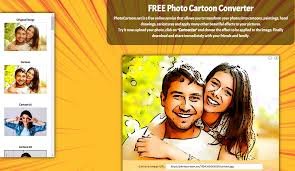
In today’s AI-driven creative ecosystem, visual content tools are evolving faster than ever. One of the niche yet widely used tools in the photo transformation space is PhotoCartoon—a web-based AI-style image editor that converts regular photographs into cartoon-style artwork within seconds.

Unlike complex professional editing software such as Photoshop or Illustrator, PhotoCartoon focuses on simplicity, speed, and accessibility. It is designed for users who want stylized cartoon avatars, artistic portraits, or fun social media visuals without needing design skills.

The rise of AI-powered image transformation tools has made platforms like PhotoCartoon especially relevant for:

  • Social media creators
  • Casual users wanting profile pictures
  • Small businesses creating branded visuals
  • Educators using visual content in presentations

This review breaks down PhotoCartoon from an expert SEO and AI product analysis perspective, following E-E-A-T (Experience, Expertise, Authority, Trustworthiness) principles so you can make an informed decision.

What Is PhotoCartoon?

PhotoCartoon is an online AI-based photo editing tool that transforms real images into cartoon-style artwork.

In simple terms, you upload a photo → the system processes it → and you receive a stylized cartoon version of your image.

Core Problem It Solves

Many users struggle with:

  • Creating stylized avatars without design skills
  • Paying for expensive graphic designers
  • Using complex software like Photoshop
  • Finding quick, fun content for social media

PhotoCartoon solves this by offering a one-click cartoonization process.

What Makes It Different?

Unlike advanced AI generators that require prompts or training, PhotoCartoon is:

  • Template-based
  • Instant output-oriented
  • Beginner-friendly
  • Browser-based (no installation needed)

It prioritizes ease of use over advanced customization.

How PhotoCartoon Works

PhotoCartoon follows a very straightforward workflow designed for non-technical users.

Step-by-Step Usage Guide

Step 1: Upload Your Image

  • Choose a selfie, portrait, or any clear photo
  • Supported formats typically include JPG and PNG

Step 2: Choose Cartoon Style

  • Select from available cartoon effects
  • Options may include sketch, painting, caricature, or comic-style filters

Step 3: AI Processing

  • The system analyzes facial structure, lighting, and edges
  • AI applies artistic transformations in real-time or near real-time

Step 4: Download Result

  • Preview the output
  • Download the cartoonized version to your device

Processing Behavior

The tool uses image filtering + AI enhancement techniques, which may include:

  • Edge detection algorithms
  • Facial mapping
  • Style transfer models

It is not a generative AI like MidJourney; instead, it focuses on image-to-image transformation.

Core Features & Capabilities

PhotoCartoon is built around simplicity, but it still offers several useful features.

1. Photo-to-Cartoon Conversion

Transforms real images into cartoon-style visuals with one click.

2. Multiple Cartoon Effects

Users can choose from different artistic styles such as:

  • Classic cartoon
  • Pencil sketch
  • Oil painting style
  • Caricature effects

3. Face Enhancement Optimization

The tool enhances facial visibility before applying effects, improving output quality.

4. Web-Based Access

No software installation required. Works directly in browsers.

5. Fast Processing

Most images are processed within seconds depending on server load.

6. Simple UI Interface

Designed for beginners with minimal learning curve.

7. Free Usage Option

Basic features are generally accessible without payment (may include limitations or watermark depending on version).

Real-World Use Cases

PhotoCartoon is not just a novelty tool—it has practical applications across different user groups.

Businesses & Startups

  • Creating playful brand avatars
  • Designing mascots for campaigns
  • Engaging social media content

Marketers & Content Creators

  • Eye-catching profile pictures
  • YouTube thumbnails with cartoon effects
  • Instagram content enhancement

Developers & Technical Users

  • Prototyping UI avatars
  • Testing image transformation workflows
  • Experimenting with image filtering APIs (if available via integrations)

Students & Educators

  • Fun classroom visuals
  • Presentation graphics
  • Creative project illustrations

Freelancers & Solopreneurs

  • Personal branding assets
  • Portfolio enhancement
  • Client mockups

Key Benefits

PhotoCartoon offers several practical advantages:

1. Time Efficiency

No need for manual editing—results are generated in seconds.

2. Cost Savings

Eliminates the need for hiring designers for simple cartoon effects.

3. Ease of Use

Even non-technical users can operate it effortlessly.

4. Creative Expression

Helps users explore artistic styles without learning design tools.

5. Accessibility

Works directly in browser across devices.

6. Fast Experimentation

Users can quickly test multiple styles in minutes.

Limitations & Things to Consider

A trustworthy review must include limitations.

1. Limited Customization

Advanced users may find the control options restrictive compared to tools like Photoshop or AI prompt-based generators.

2. Output Quality Variation

Quality depends heavily on:

  • Input image resolution
  • Lighting conditions
  • Facial clarity

3. Internet Dependency

Requires stable internet connection.

4. Watermarks (Possible in Free Version)

Some free outputs may include branding or watermarking.

5. Not a Generative AI Tool

It does not create images from text prompts.

Pricing & Plans

PhotoCartoon typically follows a freemium model, though exact pricing may vary depending on platform updates.

Free Plan

  • Basic cartoon conversions
  • Limited styles
  • Possible watermark
  • Standard processing speed

Paid Plan (If Available)

  • Higher resolution outputs
  • Additional cartoon styles
  • Faster processing
  • No watermark
  • Priority support

Enterprise / Bulk Usage

Not commonly advertised, but some similar platforms offer:

  • API access
  • Bulk image processing
  • Commercial licensing

Always check the official website for the latest pricing updates.

Pros & Cons

Pros

  • Extremely easy to use
  • Fast processing
  • Beginner-friendly UI
  • No installation required
  • Fun and engaging outputs
  • Works across devices

Cons

  • Limited creative control
  • Output quality depends on input image
  • Not suitable for professional-grade design workflows
  • Free version may include restrictions
  • Not AI prompt-based (less flexible than modern AI tools)

PhotoCartoon vs Similar AI Tools

When compared to modern AI image tools, PhotoCartoon occupies a specific niche.

PhotoCartoon

  • Focus: Image-to-cartoon conversion
  • Strength: Simplicity and speed
  • Weakness: Limited flexibility

AI Generative Tools (e.g., prompt-based art tools)

  • Focus: Full image generation
  • Strength: Highly creative and customizable
  • Weakness: Requires learning prompts and experimentation

Photoshop / Advanced Editors

  • Focus: Professional editing
  • Strength: Maximum control
  • Weakness: Steep learning curve

Key Difference

PhotoCartoon is best described as a “quick transformation tool” rather than a creative engine”.

Who Should Use PhotoCartoon?

This tool is ideal for:

  • Beginners exploring AI photo editing
  • Social media users creating avatars
  • Marketers needing fast visual content
  • Students and educators
  • Casual users who want fun edits

It is not ideal for:

  • Professional designers needing full control
  • Advanced AI artists
  • Users requiring commercial-grade design precision

Privacy, Security & Data Handling

PhotoCartoon operates as a web-based image processing tool, which means images are uploaded to its servers for processing.

Key Considerations:

  • Uploaded images are processed temporarily
  • Users should avoid uploading sensitive personal data
  • Privacy policies vary by provider version
  • No strong indication of enterprise-level compliance like GDPR certification (varies by implementation)

Trust Insight (E-E-A-T Note)

Users should always review the official privacy policy before uploading personal or sensitive images.

Final Verdict

PhotoCartoon is a simple, fast, and beginner-friendly AI photo transformation tool designed for casual and creative use cases.

It is not meant to compete with advanced AI art generators or professional editing software. Instead, it fills an important niche:

“Quick cartoon-style transformation without complexity.”

Overall Rating (Expert View)

  • Ease of Use: ⭐⭐⭐⭐⭐
  • Feature Depth: ⭐⭐⭐
  • Output Quality: ⭐⭐⭐⭐
  • Customization: ⭐⭐
  • Value for Beginners: ⭐⭐⭐⭐⭐

Conclusion

If you want a fast and fun way to convert images into cartoon-style visuals without learning complex tools, PhotoCartoon is worth trying. However, professionals seeking deep control or AI generative capabilities may find it limited.

Features

•Photo-to-cartoon conversion
•Multiple cartoon styles
•Face enhancement processing
•Web-based accessibility
•Fast image processing
•Beginner-friendly interface
•Downloadable outputs
•Free usage option

Details

There are no reviews yet.

Leave a Review

Your email address will not be published. Required fields are marked *

Explore the Newest AI Tools

Get the latest AI tools and trends delivered to your inbox. Subscribe to the AI Tool Mapper newsletter for curated AI updates.

You have been successfully Subscribed! Ops! Something went wrong, please try again.

© 2026 AI Tool Mapper. All rights reserved