Go Back
Report Abuse

Pixlr AI Photo Editor

Pixlr AI Photo Editor

Description

In the rapidly evolving world of AI-powered creative tools, Pixlr AI stands out as one of the most accessible and practical solutions for everyday image editing and design. Built by Pixlr (part of the Inmagine Group), this platform has evolved from a simple online photo editor into a full-fledged AI-assisted creative suite.

What makes Pixlr AI particularly relevant today is its balance between simplicity and capability. While many AI image tools are either too complex for beginners or too limited for professionals, Pixlr AI sits in the middle—offering browser-based editing, AI automation, and design features without requiring heavy software installation or advanced technical knowledge.

In an era where visual content drives marketing, social media, and digital communication, Pixlr AI positions itself as a fast, lightweight, and cost-effective alternative to traditional tools like Photoshop—while integrating modern AI features such as background removal, generative fill, and text-to-image creation.

What Is Pixlr AI?

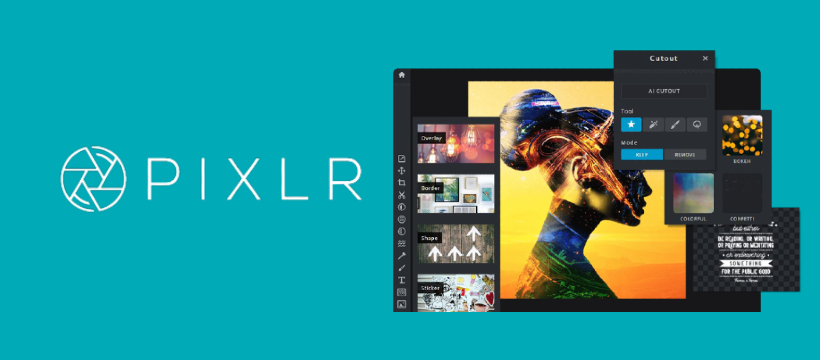
Pixlr AI is a web-based AI photo editing and design platform that allows users to create, edit, enhance, and generate images directly in their browser or mobile app.

At its core, Pixlr AI solves a simple but powerful problem:

How can users edit professional-quality images without expensive software or advanced design skills?

Instead of requiring installation-heavy desktop tools, Pixlr AI runs entirely online and integrates AI models that automate complex editing tasks such as:

  • Removing backgrounds instantly
  • Generating images from text prompts
  • Enhancing image quality automatically
  • Retouching portraits using AI filters
  • Replacing objects in photos with generative AI

Pixlr AI is widely used by designers, marketers, students, and content creators who need fast and reliable image editing without a steep learning curve.

How Pixlr AI Works

Pixlr AI is designed to be intuitive, even for first-time users. Here’s how it typically works:

1. Access the Platform

Users can start directly from:

  • Web browser (no installation required)
  • Mobile apps (iOS and Android)
  • Desktop app (optional)

2. Choose an Editing Tool

Pixlr AI offers multiple tools such as:

  • Pixlr X (simple editor)
  • Pixlr E (advanced editor)
  • AI tools suite (background remover, generative AI, etc.)

3. Upload or Generate Image

You can:

  • Upload an existing image
  • Start with a blank canvas
  • Generate an image using text prompts (AI feature)

4. Apply AI Features

Users can apply AI-powered actions like:

  • One-click background removal
  • Smart cutout tools
  • AI image enhancement
  • Object removal or replacement

5. Download or Export

Final images can be exported in:

  • PNG
  • JPG
  • WebP (depending on plan)

Everything happens in the cloud, making it fast and device-independent.

Core Features & Capabilities

Pixlr AI offers a wide range of features that blend traditional editing with AI automation.

1. AI Background Removal

One of the most popular features:

  • Automatically removes image backgrounds in seconds
  • Works well for product images, portraits, and social media content

2. AI Generative Fill

  • Replace or extend parts of an image using AI prompts
  • Useful for fixing missing areas or expanding visuals

3. AI Image Generator (Text-to-Image)

  • Create images from simple text descriptions
  • Example: “A futuristic city at sunset in cyberpunk style”

4. Photo Enhancement Tools

  • Auto-adjust brightness, contrast, and sharpness
  • Improves low-quality images instantly

5. Retouch & Beauty AI Tools

  • Skin smoothing
  • Blemish removal
  • Facial enhancements for portraits

6. Layer-Based Editing (Pixlr E)

  • Advanced users can work with layers like Photoshop
  • Supports blending modes and advanced adjustments

7. Templates & Design Assets

  • Social media templates
  • Marketing banners
  • YouTube thumbnails
  • Ads and posters

8. Cloud-Based Storage

  • Save projects online
  • Access from any device

Real-World Use Cases

Pixlr AI is not just a casual editing tool—it is widely used across multiple industries.

• Businesses & Startups

  • Create product photos for eCommerce
  • Design promotional banners
  • Build marketing creatives quickly
  • Reduce dependency on external designers

• Marketers & Content Creators

  • Social media post creation
  • Ad creatives for Facebook, Instagram, and Google Ads
  • YouTube thumbnails
  • Blog visuals and infographics

• Developers & Technical Users

  • UI mockups and prototypes
  • Rapid visual asset generation
  • Placeholder images for apps or websites

• Students & Educators

  • Presentation visuals
  • Project posters
  • Educational diagrams
  • Assignment illustrations

• Freelancers & Solopreneurs

  • Client branding materials
  • Logo drafts
  • Social media kits
  • Fast turnaround design work

Key Benefits of Pixlr AI

Pixlr AI offers several strong advantages in real-world usage:

1. Time Efficiency

Tasks that normally take hours in Photoshop can be completed in minutes.

2. No Installation Required

Fully browser-based workflow saves system resources.

3. Beginner-Friendly Interface

Even non-designers can produce professional visuals.

4. AI Automation

Reduces manual editing workload significantly.

5. Cost-Effective Alternative

Cheaper than many professional design tools.

6. Cross-Device Accessibility

Works on mobile, tablet, and desktop seamlessly.

Limitations & Things to Consider

While Pixlr AI is powerful, it is not perfect.

1. Limited Advanced Editing Control

Compared to Photoshop, advanced designers may find it restrictive.

2. AI Output Variability

Generative AI results may require multiple attempts for best output.

3. Internet Dependency

Since it is cloud-based, offline editing is not possible.

4. Free Plan Restrictions

Some AI features are locked behind premium tiers.

5. Performance Depends on Browser

Older devices or browsers may experience lag with complex projects.

Pricing & Plans

Pixlr AI follows a freemium pricing model, making it accessible to most users.

Free Plan

  • Basic editing tools
  • Limited AI features
  • Ads supported
  • Standard exports

Premium Plan (Plus)

  • Advanced AI tools
  • No ads
  • High-resolution exports
  • More templates and assets

Team/Business Plan

  • Collaboration tools
  • Commercial usage rights
  • Priority support
  • Bulk asset access

Pricing may vary by region, but generally Pixlr remains more affordable than Adobe Creative Cloud.

Pros & Cons

✔ Pros

  • Easy-to-use interface
  • Strong AI editing tools
  • No installation required
  • Good for beginners and professionals
  • Affordable pricing
  • Fast performance for quick edits

❌ Cons

  • Limited offline use
  • Advanced professionals may outgrow it
  • AI features require premium plan
  • Internet speed impacts performance

Pixlr AI vs Similar AI Tools

Pixlr AI vs Canva

  • Canva focuses more on templates and design marketing
  • Pixlr AI is stronger in photo editing and AI image manipulation

Pixlr AI vs Adobe Photoshop

  • Photoshop offers deeper professional control
  • Pixlr AI is faster, simpler, and more accessible

Pixlr AI vs Fotor AI

  • Both are similar in AI editing capabilities
  • Pixlr AI offers better browser-based workflow and flexibility

Key Differentiator:
Pixlr AI is best described as a lightweight Photoshop alternative powered by AI automation.

Who Should Use Pixlr AI?

Pixlr AI is ideal for:

  • Beginners learning image editing
  • Social media managers
  • Small businesses and startups
  • Freelance designers
  • Bloggers and content creators
  • E-commerce sellers
  • Students needing visual projects

It may not be ideal for:

  • High-end professional retouchers
  • 3D designers
  • Motion graphics artists

Privacy, Security & Data Handling

Pixlr AI operates as a cloud-based platform, meaning images are processed on remote servers.

Key points:

  • Uploaded images are processed securely
  • No strong indication of data resale practices
  • Users should still avoid uploading sensitive or confidential visuals
  • Privacy policy is aligned with standard SaaS practices

For business use, reviewing the latest privacy documentation is always recommended.

Final Verdict

Pixlr AI is one of the most practical and accessible AI-powered image editing platforms available today. It does not try to replace high-end professional tools like Photoshop entirely—instead, it focuses on speed, simplicity, and AI-assisted creativity.

For most users, especially marketers, students, freelancers, and small businesses, Pixlr AI provides an excellent balance between power and usability. Its AI features significantly reduce manual editing time while maintaining decent quality output.

However, professionals who require deep manual control may still prefer traditional desktop software.

Overall Rating: 4.4/5

Pixlr AI is highly recommended for anyone looking for a fast, affordable, and AI-enhanced image editing solution.

Features

•AI Background Removal
•Text-to-Image Generation
•Generative Fill Tool
•Photo Enhancement AI
•Layer-Based Editing
•Design Templates Library
•Cloud Storage Access
•Mobile & Web Support

Details

Listing Video

There are no reviews yet.

Leave a Review

Your email address will not be published. Required fields are marked *

Explore the Newest AI Tools

Get the latest AI tools and trends delivered to your inbox. Subscribe to the AI Tool Mapper newsletter for curated AI updates.

You have been successfully Subscribed! Ops! Something went wrong, please try again.

© 2026 AI Tool Mapper. All rights reserved