Go Back
Report Abuse

VanceAI Toongineer Cartoonizer

VanceAI
VanceAI Toongineer Cartoonizer
VanceAI
VanceAI Toongineer Cartoonizer

Description

Image-to-cartoon transformation has emerged as one of the most well-liked use cases among designers, marketers, and general consumers in the quickly developing field of AI-powered creative tools. VanceAI Toongineer, created by the renowned AI software company VanceAI, which specializes in image improvement, restoration, and creative automation tools, is one application that sticks out in this field.

VanceAI has built a reputation for offering cloud-based AI solutions that simplify complex editing tasks—ranging from upscaling low-resolution images to removing backgrounds and generating artistic transformations. Among its suite of tools, Toongineer Cartoonizer (commonly referred to as VanceAI Toongineer) is designed to convert real photos into cartoon-style artwork using deep learning models.

In today’s content-driven economy—where social media branding, profile aesthetics, and digital storytelling matter more than ever—tools like VanceAI Toongineer are becoming essential for creators, influencers, marketers, and even casual users who want visually appealing transformations without needing design skills.

What Is VanceAI Toongineer?

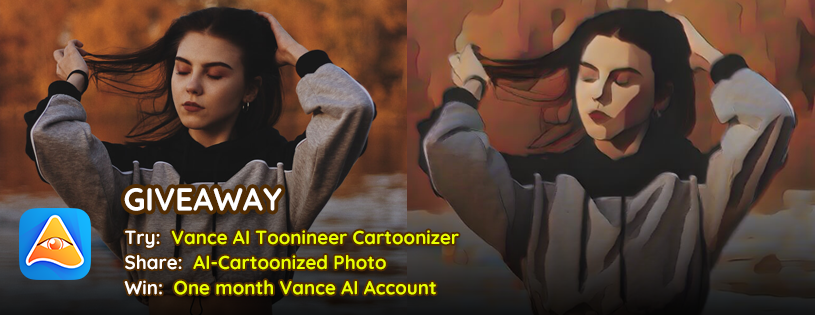
VanceAI Toongineer is an AI-powered image-to-cartoon conversion tool that transforms regular photographs into stylized cartoon illustrations in just a few seconds.

At its core, the tool solves a simple but powerful problem:

How can users turn real-life images into artistic, cartoon-like visuals without Photoshop or manual illustration skills?

Traditionally, creating cartoon-style portraits required digital artists or advanced illustration software. VanceAI Toongineer removes this barrier by using deep neural networks trained on large datasets of artistic styles and human facial features.

Key Idea Behind the Tool

  • Input: A normal photo (portrait, selfie, or object image)
  • Processing: AI detects facial structures, edges, and features
  • Output: Cartoon-style rendering with stylized effects

This makes it especially useful for:

  • Social media profile pictures
  • NFT-style avatars
  • Marketing visuals
  • Personalized gifts or creative content

How VanceAI Toongineer Works

VanceAI Toongineer is designed to be extremely beginner-friendly. No technical skills or editing experience are required.

Step-by-Step Usage Guide

1. Upload Your Image

Users begin by uploading a photo directly from their device. The platform supports common formats like JPG and PNG.

2. AI Processing Begins Automatically

Once uploaded, the AI engine analyzes:

  • Facial structure (if it’s a portrait)
  • Background elements
  • Lighting and contrast
  • Edge detection and contours

3. Style Transformation

The model applies a cartoon rendering style, which may include:

  • Smooth skin effects
  • Outline enhancement
  • Color simplification
  • Artistic shading

4. Preview & Adjust (if available)

Depending on the version, users may preview results or regenerate outputs for better variation.

5. Download Final Output

The final cartoon image can be downloaded in high resolution.

Core Features & Capabilities

VanceAI Toongineer offers a range of AI-driven capabilities that make it a competitive tool in the cartoonization space.

1. One-Click Cartoon Conversion

  • Converts photos into cartoons instantly
  • No manual editing required
  • Ideal for beginners

2. AI Face Detection

  • Automatically identifies facial features
  • Preserves identity while stylizing appearance
  • Ensures natural cartoon resemblance

3. Multiple Artistic Styles (Limited/Variant-Based)

  • Some versions offer different cartoon effects
  • Includes semi-realistic, anime-like, and stylized filters

4. Cloud-Based Processing

  • No software installation needed
  • Works entirely in browser
  • Accessible on Windows, Mac, and mobile browsers

5. High-Resolution Output

  • Produces clean and usable image files
  • Suitable for digital publishing and printing

6. Fast Processing Engine

  • Most images are processed in seconds
  • Optimized AI inference system

7. Batch Processing (Premium Feature)

  • Allows multiple image conversions in some plans
  • Useful for content creators and agencies

Real-World Use Cases

VanceAI Toongineer is not just a fun tool—it has practical applications across multiple industries.

1. Businesses & Startups

  • Create branded avatars for teams
  • Enhance marketing visuals
  • Develop engaging social media content
  • Build creative landing page assets

2. Marketers & Content Creators

  • Generate eye-catching thumbnails
  • Create Instagram and TikTok visuals
  • Build consistent visual branding
  • Design storytelling content

3. Developers & Technical Users

  • Use cartoon avatars in apps or dashboards
  • Integrate AI visuals into UI/UX prototypes
  • Generate mock user profiles

4. Students & Educators

  • Create engaging presentation visuals
  • Add fun illustrations to educational materials
  • Improve learning engagement through visuals

5. Freelancers & Solopreneurs

  • Offer cartoon portrait services to clients
  • Create personalized digital art for gigs
  • Sell creative avatar designs on marketplaces

Key Benefits

1. Time Efficiency

What would normally take hours in Photoshop can be done in seconds.

2. No Design Skills Required

Even complete beginners can create professional-looking cartoon images.

3. Cost-Effective Creativity

Eliminates the need for hiring digital illustrators for basic cartoon work.

4. Scalability

Great for agencies or creators handling multiple content requests.

5. Consistency in Output

AI ensures uniform style quality across images.

Limitations & Things to Consider

While VanceAI Toongineer is powerful, it is not perfect. A realistic review must highlight its limitations.

1. Limited Custom Control

Users cannot deeply customize brush strokes or artistic parameters like in professional design tools.

2. Dependence on Input Quality

Blurry or poorly lit photos may produce less accurate cartoon results.

3. Style Variety Is Moderate

Compared to advanced generative AI platforms, style options may feel limited.

4. Internet Dependency

Requires stable internet connection since it is cloud-based.

5. Subscription Limitations

Free usage is often restricted with credit-based processing.

Pricing & Plans

VanceAI uses a credit-based subscription model, which is common among AI SaaS platforms.

Typical Pricing Structure:

Free Plan

  • Limited credits for trial use
  • Basic resolution output
  • Watermarked or restricted usage (depending on updates)

Paid Plans

  • Monthly subscription with credit allocation
  • Faster processing priority
  • High-resolution downloads
  • Batch processing support

Enterprise / Bulk Plans

  • Designed for agencies or businesses
  • Higher credit limits
  • API access (in some cases)

💡 Pricing may vary depending on promotions and regional availability.

Pros & Cons

Pros

  • Extremely easy to use
  • Fast AI processing
  • No software installation required
  • Good output quality for social media use
  • Beginner-friendly interface
  • Works across devices

Cons

  • Limited artistic control
  • Requires credits for heavy usage
  • Output depends on input image quality
  • Not suitable for professional-level illustration editing
  • Fewer customization options compared to advanced AI art tools

VanceAI Toongineer vs Similar AI Tools

When compared to similar tools like ToonMe, Picsart Cartoonizer, and Fotor Cartoon Maker, VanceAI Toongineer stands out in a few key areas:

Strengths Compared to Competitors

  • More consistent facial preservation
  • Cleaner AI rendering output
  • Faster cloud processing
  • Stronger integration with VanceAI ecosystem (enhancement tools, upscalers, etc.)

Where Competitors Win

  • Some apps like ToonMe offer more playful filters
  • Picsart provides broader editing ecosystem
  • Fotor offers more design templates and creative tools

Final Comparison Insight

VanceAI Toongineer is best suited for users who want:

Clean, fast, and realistic cartoon transformations without unnecessary complexity.

Who Should Use VanceAI Toongineer?

This tool is ideal for:

  • Social media influencers
  • Digital marketers
  • Content creators
  • Freelancers offering design services
  • Casual users creating avatars or profile pictures
  • Small businesses needing quick visuals

It may not be ideal for:

  • Professional illustrators requiring manual control
  • Advanced animation studios
  • Users seeking highly customizable generative art tools

Privacy, Security & Data Handling

VanceAI generally operates as a cloud-based AI platform, which means images are processed on remote servers.

Key Privacy Considerations:

  • Uploaded images are processed temporarily
  • Most AI SaaS tools of this type do not permanently store user images (subject to policy updates)
  • Users should always review official privacy policy before uploading sensitive data

Recommendation:

Avoid uploading confidential or sensitive personal images unless you are comfortable with cloud processing policies.

Final Verdict

VanceAI Toongineer is a reliable and efficient AI cartoon generator designed for speed, simplicity, and accessibility.

It is not trying to replace professional digital artists—instead, it focuses on democratizing cartoon-style image creation for everyday users.

If your goal is to:

  • Create quick cartoon portraits
  • Enhance social media visuals
  • Experiment with AI-generated art
  • Save time on manual editing

Then VanceAI Toongineer is absolutely worth trying.

However, if you need deep customization or professional illustration control, you may find its capabilities somewhat limited.

Overall, it strikes a strong balance between usability and output quality, making it one of the more dependable AI cartoon tools in the market.

Features

•One-click cartoon conversion
•AI facial feature detection
•Cloud-based processing
•High-resolution image output
•Fast rendering engine
•Beginner-friendly interface
•Batch processing (premium)
•Multiple cartoon styles

Details

Listing Video

There are no reviews yet.

Leave a Review

Your email address will not be published. Required fields are marked *

Explore the Newest AI Tools

Get the latest AI tools and trends delivered to your inbox. Subscribe to the AI Tool Mapper newsletter for curated AI updates.

You have been successfully Subscribed! Ops! Something went wrong, please try again.

© 2026 AI Tool Mapper. All rights reserved