Zapier AI automation helps individuals and businesses connect thousands of apps and automate workflows without writing code. Using AI by Zapier, users can create intelligent automations that trigger actions, generate responses, summarize content, and coordinate multi-step workflows across tools like Gmail, Slack, Google Sheets, and CRM platforms.
This Zapier AI automation tutorial explains how to build AI-powered workflows, create chatbot automations, and integrate multiple apps into a single automated system. Whether you want to automate marketing, sales pipelines, customer support, or internal operations, Zapier’s AI tools make automation accessible to beginners and scalable for businesses.
Key Takeaways
- Zapier is a leading no-code automation platform connecting 6000+ apps.
- AI by Zapier enables automated workflows with natural language processing and AI actions.
- Businesses can build chatbots, marketing automation systems, and data pipelines.
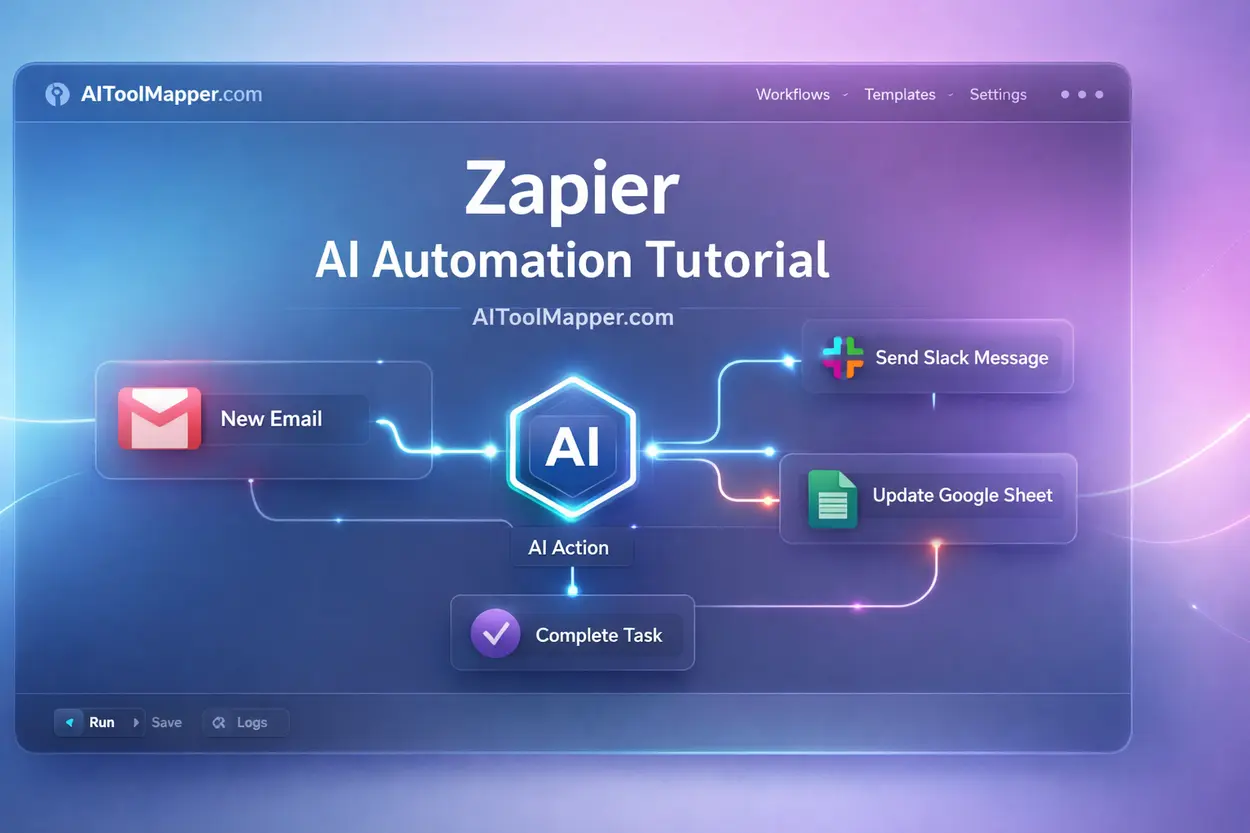
- Zapier automation follows a simple structure: Trigger → AI Processing → Action.
- The platform provides free and paid plans, depending on the number of tasks and advanced automation needs.
What is Zapier AI Automation?
Automation used to require developers, APIs, and complicated infrastructure. Today, platforms like Zapier have changed the game.
With Zapier AI automation, you can connect apps, automate repetitive tasks, and add artificial intelligence into workflows — all without coding.
Imagine this scenario:
A customer submits a form → AI summarizes the request → the system creates a support ticket → your team gets notified in Slack.
No manual work. No coding.
That’s the power of AI automation.
Overview of Zapier Automation
At its core, Zapier acts as a digital bridge between applications.
If you use tools like:
- Gmail
- Slack
- Google Sheets
- Notion
- HubSpot
Zapier allows them to communicate with each other.
Instead of manually copying data between apps, you can automate the process.
For example:
- When a new lead appears in HubSpot, send a Slack message.
- When a Google Form submission happens, store it in Google Sheets.
- When a customer email arrives, AI generates a reply.
This automation system is called a Zap.
A Zap contains:
- Trigger
- Action
- Optional AI processing
What is AI by Zapier?
AI by Zapier is the platform’s AI layer that brings machine intelligence into workflows.
Instead of simple automation rules, your workflows can now:
- summarize long content
- generate responses
- classify data
- extract structured information
- write messages
For example:
A support email arrives → AI reads the message → categorizes it → routes it to the correct department.
This transforms Zapier from a simple automation platform into an AI workflow orchestration system.
How Zapier AI Works
Every Zapier AI workflow automation follows a structured sequence:
1. Trigger
The workflow begins with an event.
Examples:
- New email received
- New form submission
- New CRM lead
- New Shopify order
2. AI Processing
AI analyzes the data.
Examples:
- Summarize text
- Extract key information
- Generate reply
- Categorize data
3. Action
The system performs a task.
Examples:
- Send Slack message
- Update database
- Create task
- Respond to user
This Trigger → AI → Action structure forms the backbone of modern automation platforms.
Key Features of the Zapier AI Tool
Let’s explore the features that make Zapier one of the most powerful automation platforms available today.
AI Actions
AI Actions allow automated workflows to process information intelligently.
Examples include:
- summarizing emails
- generating responses
- categorizing messages
- extracting structured data
Suppose your marketing team receives dozens of lead emails daily.
Instead of reading them manually, AI can:
- summarize the email
- extract contact details
- assign lead priority
This dramatically reduces manual work.
Zapier AI Chatbot
Another powerful feature is the Zapier AI chatbot.
Chatbots powered by automation can:
- respond to website visitors
- answer support questions
- capture leads
- route inquiries
Instead of hiring a large support team, businesses can deploy chatbots that operate 24/7.
A typical chatbot workflow looks like this:
Customer message → AI analyzes intent → automated response → CRM entry.
Zapier AI Orchestration
Large businesses often require multi-step automation systems.
This is where AI orchestration comes in.
Zapier can coordinate:
- multiple triggers
- conditional workflows
- data transformations
- AI decisions
Think of it as a workflow conductor managing dozens of automated tasks simultaneously.
Zapier App Integrations
Zapier supports integrations with thousands of applications.
Popular integrations include:
- Gmail
- Slack
- Google Sheets
- Notion
- HubSpot
- Shopify
- Trello
Because of these integrations, Zapier becomes the central automation hub of your digital workflow.
How to Use Zapier AI (Step-by-Step Tutorial)
If you’re new to automation, don’t worry.
This Zapier AI tutorial for beginners will walk you through the process.
Step 1: Create a Zapier Account
First, sign up on the Zapier website.
After registering, you’ll access the Zapier dashboard, where you can create workflows.
The dashboard contains:
- Zap builder
- automation templates
- task history
- app integrations
Step 2: Choose a Trigger App
A trigger starts the automation.
Examples:
- New Gmail email
- New Google Form response
- New CRM contact
- New Slack message
Example trigger:
New lead submitted via website form
Step 3: Add an AI Action
Next, insert an AI action.
Possible AI tasks include:
- summarize lead messages
- generate email response
- classify customer intent
- extract contact details
Example:
Lead message → AI summarizes the inquiry.
Step 4: Connect an Output App
Now select the final action.
Examples:
- send Slack notification
- update CRM
- create task in Trello
- store data in Google Sheets
Example workflow:
Lead form → AI summary → Slack notification.
Step 5: Test and Activate Automation
Before activating the workflow, Zapier allows you to test the automation.
Testing ensures:
- triggers work correctly
- AI outputs are accurate
- actions perform as expected
Once verified, turn the Zap ON.
Your automation is now live.
Zapier AI Automation Examples
Understanding real-world applications helps clarify how automation works.
Let’s explore practical Zapier AI automation examples.
Marketing Automation
Marketing teams rely heavily on automation.
Example workflow:
New website lead → AI qualifies the lead → CRM entry → automated email response.
Benefits:
- faster lead response
- improved conversion rates
- reduced manual work
Sales Automation
Sales teams deal with large volumes of prospects.
Automation can:
- analyze lead messages
- score leads
- assign sales representatives
- update CRM records
This helps teams focus on high-value prospects.
Customer Support Automation
Customer service is one of the biggest beneficiaries of AI automation.
Example workflow:
Support email received → AI categorizes issue → ticket assigned → customer receives automated reply.
This system reduces response time dramatically.
Content Automation
Content teams also benefit from automation.
Example:
New blog topic → AI generates outline → stored in Notion → editorial team notified.
Platforms like AI Tool Mapper often explore these automation possibilities while reviewing AI tools and workflows for businesses.
Zapier AI Chatbot Tutorial
Let’s build a Zapier AI chatbot workflow.
Step 1: Connect Chat Platform
Choose a chatbot interface such as:
- website chat widget
- Slack bot
- support messaging platform
Step 2: Add AI Response Generation
AI analyzes the incoming message.
Possible tasks:
- detect intent
- summarize query
- generate response
Step 3: Trigger Customer Queries
Whenever a visitor asks a question, the chatbot triggers the workflow.
Step 4: Send Automated Reply
The system generates a response and sends it instantly.
You can also store the conversation in your CRM for follow-ups.
Common Chatbot Use Cases
- website support chatbot
- lead capture bot
- FAQ automation
- onboarding assistant
Is Zapier AI Free?
A common question beginners ask is:
Is Zapier AI free?
Let’s break it down.
Zapier Free Plan
The free plan offers:
- limited tasks per month
- basic automation
- simple triggers and actions
It’s ideal for personal workflows and experimentation.
Paid Plans
Paid plans unlock:
- multi-step workflows
- premium app integrations
- advanced automation logic
- higher task limits
- AI features
When to Upgrade
Businesses should upgrade when they need:
- multi-step automation
- higher automation volume
- team collaboration
- complex AI workflows
Benefits of Using Zapier AI Automation
Why are so many businesses adopting AI automation?
Because the advantages are substantial.
Time-Saving Automation
Automation removes repetitive tasks such as:
- copying data
- sending notifications
- updating spreadsheets
This frees employees to focus on higher-value work.
No-Code Workflow Creation
Zapier allows non-technical users to build automation.
No programming required.
This democratizes automation across teams.
Scalable Business Automation
As businesses grow, workflows become more complex.
Zapier supports scalable automation across departments.
Flexible App Integration
Because Zapier integrates thousands of tools, it can automate nearly any digital process.
Zapier AI vs Other Automation Tools
Let’s compare Zapier with other automation platforms.
| Feature | Zapier | Make | n8n |
|---|---|---|---|
| Ease of use | Very beginner friendly | Moderate | Technical |
| Integrations | 6000+ apps | 1000+ apps | Developer focused |
| AI capabilities | Built-in AI actions | Limited | Custom AI |
| Pricing | Medium | Medium | Open-source option |
Zapier vs Make
Make offers visual workflow builders.
However, Zapier typically provides more integrations and beginner-friendly setup.
Zapier vs n8n
n8n is an open-source automation platform.
It’s powerful but requires more technical knowledge.
Zapier vs Microsoft Power Automate
Microsoft Power Automate integrates well with Microsoft products but may be less flexible for non-Microsoft ecosystems.
Best Zapier AI Use Cases for Businesses
Different industries use automation differently.
Marketing Teams
Automations include:
- email campaigns
- lead capture
- social media scheduling
Ecommerce Automation
Ecommerce businesses automate:
- order notifications
- customer follow-ups
- review requests
SaaS Companies
SaaS workflows include:
- onboarding automation
- user analytics alerts
- feature feedback collection
Content Creators
Creators automate:
- social media posting
- newsletter distribution
- idea management
Agencies
Marketing agencies automate:
- client reporting
- campaign updates
- lead pipelines
Common Zapier AI Automation Mistakes
Even powerful tools can fail if workflows are poorly designed.
Common mistakes include:
Too Many Triggers
Multiple triggers can create conflicting workflows.
Automation Loops
Workflows triggering themselves can cause infinite loops.
Poor Workflow Design
Automation should simplify processes — not complicate them.
Ignoring Error Handling
Always add fallback actions or notifications when automation fails.
Zapier AI Alternatives
While Zapier is powerful, some alternatives may suit certain needs better.
Make.com
Best for visual workflow builders.
n8n
Best for developers and self-hosted automation.
Pabbly Connect
Affordable option for small businesses.
IFTTT
Great for simple personal automation.
Future of AI Automation with Zapier
Automation technology is evolving rapidly.
Future trends include:
- AI workflow orchestration
- autonomous AI agents
- predictive automation systems
- intelligent business process automation
Platforms like Zapier are moving toward self-optimizing workflows, where AI not only executes tasks but also improves automation logic.
Frequently Asked Questions
1. What is Zapier AI used for?
Zapier AI is used to automate repetitive tasks across multiple apps while adding intelligent decision-making into workflows. Businesses use it to summarize emails, classify customer queries, generate responses, extract data, and manage multi-step automations across CRM systems, marketing tools, and communication platforms—saving time and improving efficiency.
2. How does Zapier AI automation work?
Zapier AI automation works through a simple workflow structure: trigger → AI processing → action. A trigger event, such as receiving an email, activates the workflow. AI then analyzes or transforms the data, and Zapier performs an automated action like sending a message, updating a record, or generating a response.
3. Is Zapier AI free to use?
Zapier offers a free plan that includes basic automation features and limited monthly tasks, making it suitable for beginners. However, advanced AI capabilities, multi-step workflows, and premium app integrations are available in paid plans, which are better suited for businesses with higher automation needs.
4. Can Zapier create AI chatbots?
Yes, Zapier can be used to create AI-powered chatbots by integrating messaging platforms with AI tools. These chatbots can automatically respond to user queries, qualify leads, provide customer support, and route conversations to the appropriate teams based on user intent and predefined workflows.
5. What apps integrate with Zapier AI?
Zapier integrates with thousands of popular apps such as Gmail, Slack, Google Sheets, Notion, HubSpot, and Shopify. These integrations allow users to connect different tools and automate workflows across marketing, sales, operations, and customer service without needing technical expertise.
6. Is Zapier good for beginners?
Yes, Zapier is highly beginner-friendly due to its no-code interface and simple workflow builder. Users can easily create automations using triggers and actions without programming knowledge. Pre-built templates and guided setup make it especially useful for individuals and small businesses starting with automation.
7. How to use Zapier AI for workflow automation?
To use Zapier AI, start by selecting a trigger app and event, then add an AI action such as summarizing or generating content. Finally, connect an output app to complete the workflow. Testing and activating the automation ensures everything runs smoothly without manual intervention.
8. What are Zapier AI actions?
Zapier AI actions are built-in AI-powered steps that process data within workflows. These actions can summarize text, extract information, generate replies, or classify content. They enhance traditional automation by adding intelligence, making workflows more dynamic and capable of handling complex tasks.
9. Can Zapier automate business processes?
Yes, Zapier can automate a wide range of business processes including lead management, email marketing, customer support, and internal operations. By connecting apps and automating repetitive tasks, businesses can improve productivity, reduce errors, and scale operations efficiently without hiring additional resources.
10. What is Zapier AI orchestration?
Zapier AI orchestration refers to managing multi-step workflows that involve multiple apps, triggers, and AI-driven decisions. It allows businesses to automate complex processes where different tools work together seamlessly, ensuring data flows smoothly across systems and tasks are executed in the correct sequence.
11. Is Zapier better than Make or n8n?
Zapier is generally better for beginners due to its ease of use and large number of integrations. Tools like Make and n8n offer more flexibility and customization but may require technical knowledge. The best choice depends on your workflow complexity, budget, and technical expertise.
12. What are the best Zapier AI automation examples?
Some of the best Zapier AI automation examples include lead qualification workflows, automated email responses, AI-powered customer support systems, content generation pipelines, and CRM updates. These examples demonstrate how businesses can streamline operations and improve efficiency using AI-driven automation.
Conclusion
Automation is no longer a luxury — it’s a competitive advantage.
With Zapier AI automation, individuals and businesses can streamline workflows, reduce manual work, and build intelligent systems that operate around the clock.
From marketing automation to AI chatbots and sales workflows, the possibilities are almost limitless.
If you’re new to automation, start with a simple workflow. Then gradually expand into multi-step AI orchestration.
Once you experience the power of automation, you’ll wonder how you ever worked without it.