Go Back
Report Abuse

BeFunky Cartoonizer

BeFunky AI Photo Editor
BeFunky Cartoonizer
BeFunky AI Photo Editor
BeFunky Cartoonizer

Description

Visual storytelling has emerged as one of the most effective methods of drawing viewers in today’s rapidly evolving digital content economy. Users are always searching for tools that can turn commonplace pictures into captivating, stylish visuals, whether they are using them for social media branding, YouTube thumbnails, marketing creatives, or personal art projects.

One such widely recognized tool in this space is BeFunky Cartoonizer, developed by BeFunky Inc., a company known for its online photo editing and design platform. BeFunky has been around for years in the creative software industry, positioning itself as a simple yet powerful alternative to complex tools like Photoshop.

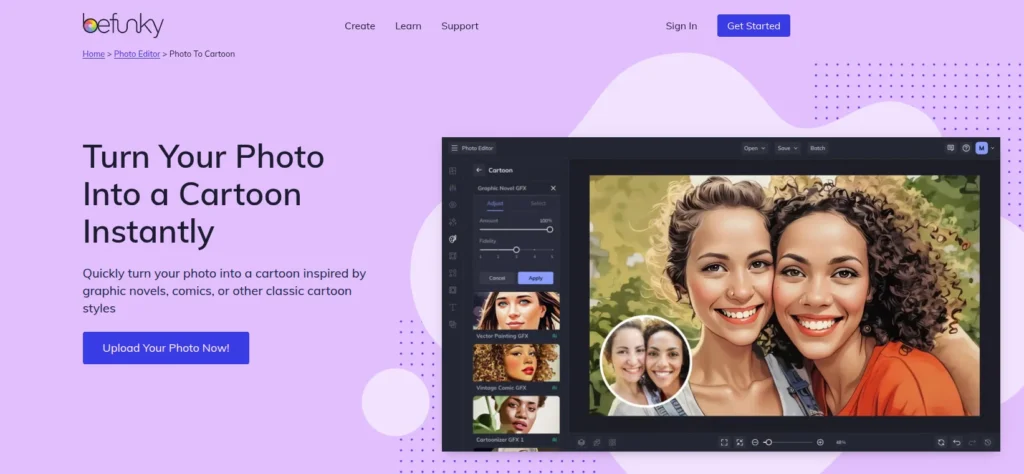
The Cartoonizer feature stands out because it allows users to convert real photos into cartoon-style artwork using AI-assisted filters and effects. While not a “pure generative AI model” in the modern text-to-image sense, it uses smart image processing techniques combined with artistic filters to simulate cartoon, sketch, and painting styles.

In an era where AI-generated visuals dominate social media and digital marketing, BeFunky Cartoonizer remains relevant due to its ease of use, fast processing, and beginner-friendly design workflow.

What Is BeFunky Cartoonizer?

BeFunky Cartoonizer is an online image transformation tool that converts regular photographs into cartoon-style illustrations. It is part of the larger BeFunky Photo Editor suite, which includes:

  • Photo editing tools
  • Collage maker
  • Graphic design templates
  • AI-powered enhancement features

At its core, the Cartoonizer tool solves a simple but powerful problem:

“How can I turn a real photo into a visually appealing cartoon or artistic illustration without needing design skills?”

Instead of manually editing images using complex software, users can upload a photo and apply cartoon filters with a single click.

What makes it different?

Unlike advanced AI image generators that create images from text prompts, BeFunky Cartoonizer focuses on photo-to-cartoon transformation, making it ideal for users who already have an image and want to stylize it quickly.

How BeFunky Cartoonizer Works

One of the biggest strengths of BeFunky Cartoonizer is its simplicity. You don’t need technical skills, plugins, or installation.

Step-by-Step Process

Step 1: Upload Your Image

  • Users can upload images from their device, Google Drive, or social media.

Step 2: Open the Cartoonizer Tool

  • Navigate to the “Effects” or “Cartoonizer” section inside the BeFunky editor.

Step 3: Choose a Style

  • Select from multiple cartoon filters such as:
    • Cartoon
    • Oil painting style
    • Sketch effect
    • Digital art style

Step 4: Adjust Intensity

  • Users can fine-tune:
    • Contrast
    • Color saturation
    • Edge sharpness
    • Artistic intensity

Step 5: Download or Export

  • Save the final output in high-resolution format or share directly on social platforms.

The entire workflow is browser-based, meaning no installation is required.

Core Features & Capabilities

BeFunky Cartoonizer is not just a single filter—it is a combination of creative enhancement tools designed for quick visual transformation.

1. AI-Powered Cartoon Effects

  • Converts real photos into cartoon-style illustrations
  • Offers multiple artistic variations
  • Maintains facial structure and background consistency

2. One-Click Transformation

  • No manual editing required
  • Instant preview of results
  • Beginner-friendly interface

3. Multiple Artistic Styles

Users can choose from:

  • Cartoon effects
  • Sketch filters
  • Pop art styles
  • Painting-style transformations

4. Advanced Image Editing Controls

  • Brightness and contrast adjustments
  • Sharpness control
  • Color correction tools
  • Background enhancement

5. High-Resolution Export

  • Supports HD downloads (depending on plan)
  • Suitable for print and digital use

6. Cloud-Based Editing

  • Works directly in browser
  • No software installation needed
  • Accessible from any device

7. Integrated Design Suite

  • Combine cartoon images with templates
  • Create posters, social media posts, and thumbnails

Real-World Use Cases

BeFunky Cartoonizer is widely used across different industries and user groups.

1. Businesses & Startups

  • Create branded cartoon avatars for marketing
  • Design fun promotional graphics
  • Build engaging social media campaigns

2. Marketers & Content Creators

  • Generate eye-catching Instagram posts
  • Create YouTube thumbnails with cartoon effects
  • Improve engagement using visual storytelling

3. Developers & Technical Users

  • Quickly generate sample UI avatars
  • Use stylized images in app mockups
  • Test visual content in prototypes

4. Students & Educators

  • Create fun classroom visuals
  • Design presentation slides
  • Turn educational portraits into engaging visuals

5. Freelancers & Solopreneurs

  • Offer cartoon portrait services to clients
  • Sell custom avatars on gig platforms
  • Create personalized digital art for branding

Key Benefits

BeFunky Cartoonizer offers several practical advantages:

  • Time Efficiency: Instant transformation without manual editing
  • Ease of Use: No learning curve required
  • Creative Flexibility: Multiple artistic styles available
  • Accessibility: Works directly in browser
  • Cost-Effective: Free version available
  • Good for Beginners: Ideal for non-designers
  • Marketing Friendly: Useful for social media content creation

Limitations & Things to Consider

To maintain transparency and trust (E-E-A-T standards), it’s important to highlight limitations:

  • Not a fully generative AI tool (works more like filter-based AI)
  • Limited customization compared to Photoshop or advanced AI tools
  • Some premium features locked behind paid subscription
  • Output quality depends heavily on input image quality
  • Less control over deep artistic generation compared to tools like Midjourney or DALL·E

While these limitations exist, they are expected for a browser-based creative editor focused on simplicity.

Pricing & Plans

BeFunky operates on a freemium model:

Free Plan

  • Basic cartoon effects
  • Limited editing features
  • Standard-resolution downloads

BeFunky Plus (Paid Plan)

  • Full access to Cartoonizer styles
  • High-resolution exports
  • Advanced editing tools
  • No watermark
  • Priority processing

Enterprise/Business Use

  • Team collaboration features (limited availability)
  • Bulk editing capabilities (depending on subscription)

Pricing may vary by region and promotion.

Pros & Cons

Pros

  • Extremely easy to use
  • Fast image processing
  • No software installation required
  • Good variety of cartoon styles
  • Suitable for beginners and casual users
  • Integrated with full design suite

Cons

  • Not true generative AI (filter-based system)
  • Limited advanced customization
  • Premium features require subscription
  • Less control compared to professional tools
  • Dependent on image quality

BeFunky Cartoonizer vs Similar AI Tools

When compared with modern AI tools, BeFunky Cartoonizer sits in a slightly different category.

FeatureBeFunky CartoonizerAI Image Generators (e.g., text-to-image tools)
Input TypeExisting photoText prompt
Output StyleCartoon/filter-basedFully generated images
Ease of UseVery easyMedium to advanced
CustomizationModerateHigh
SpeedFastVaries
Target UsersBeginners, marketersDesigners, AI creators

Key Difference

BeFunky focuses on photo transformation, while modern AI tools focus on image generation from scratch.

Who Should Use BeFunky Cartoonizer?

This tool is ideal for:

  • Beginners in digital design
  • Social media marketers
  • Content creators and influencers
  • Small business owners
  • Students creating presentations
  • Freelancers offering quick design services

It is not ideal for users looking for:

  • Advanced AI art generation
  • Deep prompt-based creative control
  • Professional-grade illustration workflows

Privacy, Security & Data Handling

BeFunky operates as a cloud-based platform. According to general SaaS practices:

  • Images are processed on secure servers
  • Users retain ownership of uploaded content
  • Data is not publicly shared
  • Privacy policy governs image storage and usage
  • Account-based features require email authentication

For sensitive or confidential images, users should always review the platform’s privacy policy before uploading.

Final Verdict

BeFunky Cartoonizer is a reliable, beginner-friendly, and fast image-to-cartoon conversion tool that serves a specific but valuable niche in the creative software ecosystem.

It is not designed to compete with advanced AI generative art tools, but rather to offer a simple and accessible way to create cartoon-style visuals instantly.

If your goal is quick social media content creation, fun visual transformations, or basic digital art enhancement without complexity, BeFunky Cartoonizer is absolutely worth trying.

However, if you require deep AI customization or professional-level generative control, you may need more advanced AI platforms.

Features

•Photo to cartoon conversion
•AI-powered artistic filters
•Sketch and painting effects
•Browser-based editing
•High-resolution export (paid plan)
•Integrated design suite
•Social media content creation tools
•Easy drag-and-drop interface

Details

There are no reviews yet.

Leave a Review

Your email address will not be published. Required fields are marked *

Explore the Newest AI Tools

Get the latest AI tools and trends delivered to your inbox. Subscribe to the AI Tool Mapper newsletter for curated AI updates.

You have been successfully Subscribed! Ops! Something went wrong, please try again.

© 2026 AI Tool Mapper. All rights reserved