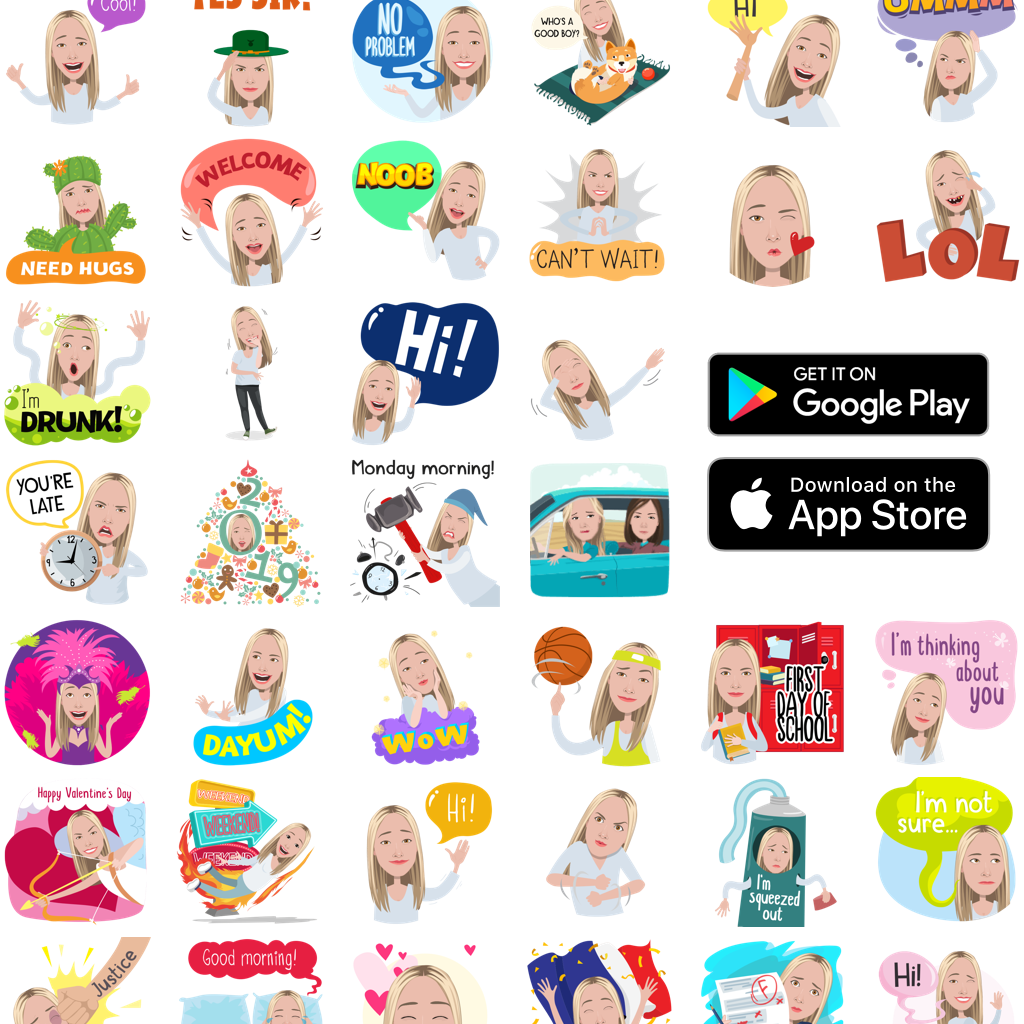
Mirror AI is a consumer-focused artificial intelligence application designed to transform selfies and photos into expressive, stylized avatars and animated characters. It gained popularity as part of the broader wave of AI avatar generators that blend computer vision, facial recognition, and generative AI to create personalized digital identities for messaging, social media, and entertainment.
Unlike complex creative AI platforms built for professionals, Mirror AI focuses on simplicity and accessibility. Its core idea is straightforward: take a selfie, and within seconds, generate a cartoon-like or stylized version of yourself that can be used in chats, stickers, and digital conversations.
In today’s AI ecosystem—where personalization and digital identity are becoming central—Mirror AI sits in the “social creativity” category. It is widely used by casual users, especially on mobile devices, to create expressive avatars that replace traditional emojis and stickers.
While it is not positioned as a professional-grade AI design tool, its ease of use and entertainment-first approach have made it a recognizable name in the avatar-generation space.
What Is Mirror AI?
Mirror AI is an AI-powered avatar creation app that converts real human faces into stylized digital characters. These avatars can be used in messaging apps, social platforms, and sticker packs.
At its core, Mirror AI solves a simple but growing problem:
People want personalized digital expression beyond emojis and static profile pictures.
Instead of using generic stickers or filters, users can generate avatars that actually look like them (or stylized versions of them) and use those avatars in conversations.
What makes it different?
- Focuses on selfie-to-avatar transformation
- Built for mobile-first social communication
- Generates custom emoji/sticker packs
- Prioritizes fun, personalization, and ease of use
It is part of a wider category of AI tools that includes avatar generators, face filters, and digital identity creators.
How Mirror AI Works
Mirror AI is designed to be extremely beginner-friendly. The workflow is almost entirely automated.
Step-by-step usage process:
Step 1: Install the App
- Available on mobile platforms (iOS and Android)
- Download from official app stores
Step 2: Upload or Take a Selfie
- Users either take a new photo or upload an existing one
- The AI scans facial structure, landmarks, and expressions
Step 3: AI Processing
- Facial recognition models map key features:
- Eyes
- Jawline
- Hair outline
- Skin tone approximation
- The system then applies stylization models
Step 4: Avatar Generation
- The AI generates multiple avatar styles such as:
- Cartoon avatars
- Emoji-style faces
- Animated expressions
- Sticker-ready expressions
Step 5: Export & Use
- Users can export avatars as:
- Stickers
- Emoji packs
- Shareable images
- Integrations with messaging apps may be available depending on device
The entire process typically takes less than a minute, making it highly accessible for non-technical users.
Core Features & Capabilities
Mirror AI focuses on creativity and personalization rather than professional editing tools. Below are its key features:
1. AI Avatar Generator
Transforms real selfies into stylized cartoon avatars using deep learning models.
2. Sticker Pack Creation
Automatically converts avatars into expressive sticker sets for messaging apps.
3. Facial Expression Variations
Generates multiple emotional expressions such as:
- Happy
- Angry
- Surprised
- Sad
- Playful
4. Style Transformation Filters
Applies different artistic styles to avatars:
- Cartoon style
- Comic-style rendering
- Simplified emoji-like visuals
5. Selfie-Based Personalization
Ensures avatars resemble the user based on facial feature mapping.
6. Social Sharing Tools
Allows quick sharing of avatars to:
- WhatsApp
- Instagram
- Messenger
- Other chat apps
7. Automatic Sticker Generation
Instead of manual design, the system auto-creates usable sticker packs.
8. Mobile-Optimized UI
Built specifically for touch interaction and fast creation workflows.
Real-World Use Cases
Mirror AI is not a productivity tool in the traditional sense. Its value lies in communication, identity expression, and entertainment.
• Businesses & Startups
- Small brands use avatars for informal social media engagement
- Helps humanize brand communication in chat-based support systems
- Useful for experimental marketing campaigns targeting younger audiences
• Marketers & Content Creators
- Creates personalized stickers for audience engagement
- Useful in influencer branding for interactive storytelling
- Enhances social media posts with custom visuals
• Developers & Technical Users
- Used as a reference in building avatar-generation systems
- Helpful for testing AI-based facial recognition workflows
- Not typically used in production development environments
• Students & Educators
- Students use it for fun digital identity creation
- Can be used in creative assignments or digital storytelling projects
- Teachers occasionally use avatars for engagement in online learning environments
• Freelancers & Solopreneurs
- Freelancers use avatars for personal branding on social platforms
- Helps create recognizable digital identity without professional photoshoots
- Useful for content creators managing multiple social accounts
Key Benefits
Mirror AI offers several practical advantages, especially in casual digital communication:
- Fast Creation — Generates avatars in under a minute
- High Accessibility — No design skills required
- Personalized Expression — Turns real photos into expressive characters
- Improved Social Engagement — Stickers increase interaction in chats
- Mobile Convenience — Designed for on-the-go usage
- Creative Identity Building — Helps users build digital persona
- Entertainment Value — Fun and engaging user experience
Limitations & Things to Consider
While Mirror AI is popular, it has several limitations worth noting:
- Limited Professional Use — Not suitable for design agencies or advanced editing workflows
- Style Constraints — Avatar styles are predefined and not highly customizable
- Privacy Concerns — Users must upload selfies, which may raise data sensitivity questions
- Internet Dependency — Requires stable internet for processing
- Not Open-Ended AI — Unlike generative art tools, it does not allow prompt-based creation
- Subscription Gating — Some features may be locked behind paywalls depending on platform version
From an E-E-A-T perspective, it is important to understand that Mirror AI is primarily an entertainment tool rather than a professional-grade AI solution.
Pricing & Plans
Mirror AI typically follows a freemium mobile app model, though exact pricing may vary by region and app store policies.
Common structure:
- Free Plan
- Basic avatar creation
- Limited sticker packs
- Standard resolution outputs
- Freemium Tier (In-App Purchases)
- Additional avatar styles
- Expanded sticker collections
- Faster processing or premium filters
- Paid Subscription
- Unlimited avatar generation
- Premium styles and animations
- Ad-free experience
- Enterprise Plan
- Not typically offered (consumer-focused app)
Pricing is primarily handled through Apple App Store and Google Play billing systems.
Pros and Cons
Pros
- Extremely easy to use
- Fast AI-based avatar generation
- Fun and engaging for social communication
- Great for personalized sticker creation
- Mobile-first convenience
- No technical skills required
Cons
- Limited customization control
- Not suitable for professional design workflows
- Privacy concerns around selfie uploads
- Some features may require payment
- Style output can feel repetitive over time
Mirror AI vs Similar AI Tools
Mirror AI competes with several avatar and AI portrait tools such as Lensa AI, Remini AI, and other face-to-avatar generators.
Key differences:
- Mirror AI
- Focus: Messaging and sticker-based avatars
- Strength: Chat integration and fun usage
- Lensa AI
- Focus: Artistic AI portraits
- Strength: High-quality stylized images
- Remini AI
- Focus: Photo enhancement and face restoration
- Strength: Image quality improvement
- Bitmoji (Snapchat ecosystem)
- Focus: Manual avatar customization
- Strength: Deep personalization control
What makes Mirror AI unique?
Its strongest advantage is instant social usability—avatars are not just images but communication assets designed for messaging apps.
Who Should Use Mirror AI?
Mirror AI is best suited for:
- Casual users who enjoy personalized emojis
- Social media users who want unique avatars
- Content creators looking for engagement tools
- Teenagers and young adults interested in digital identity
- Anyone who prefers visual communication over text
It is NOT ideal for:
- Professional designers
- Photographers requiring high-end editing tools
- Developers needing API-based avatar systems
Privacy, Security & Data Handling
Since Mirror AI processes facial images, privacy is an important consideration.
Key points:
- Users upload selfies for processing
- AI systems analyze facial structure data
- Data handling policies depend on app store regulations
- Users should review privacy policy before uploading images
Best practice recommendations:
- Avoid uploading sensitive or official identification photos
- Use only personal casual selfies
- Check data retention policies in-app
While most consumer apps follow standard compliance practices, transparency varies across mobile platforms.
Final Verdict
Mirror AI is a lightweight, entertainment-focused AI tool that excels in one area: turning selfies into expressive, shareable avatars.
It does not compete with advanced generative AI platforms in terms of creative depth or professional utility. Instead, it focuses on fast, fun, and social AI expression.
Overall assessment:
- Great for casual users ✔
- Excellent for social communication ✔
- Not suitable for professional creative workflows ✖
If your goal is to enhance messaging, create fun identity-based stickers, or explore AI avatars without complexity, Mirror AI is a solid and accessible option.