
Walk into any college library today and you’ll see fewer printed study guides and more open laptops with AI chat windows running alongside textbooks. The shift is real, measurable, and accelerating. AI tools for students have moved well beyond novelty — they are becoming a genuine part of how millions of learners manage coursework, conduct research, organize notes, and prepare for exams.
But why exactly are students turning to AI? The honest answer is that academic life in 2026 is demanding in ways previous generations didn’t face. Students juggle heavier reading loads, more complex assignments, tighter deadlines, and the constant pressure to produce original, well-researched work. On top of that, many students are balancing part-time jobs, family responsibilities, or learning in a second language. AI tools don’t remove those pressures, but when used thoughtfully, they can make the workload more manageable.
According to research published by the EDUCAUSE Center for Analysis and Research, the adoption of AI-assisted learning tools in higher education has grown sharply since 2023, with institutions reporting that students who use AI tools strategically — for organizing research, checking drafts, and understanding difficult concepts — tend to demonstrate better time management rather than reduced effort.
The common challenges students face include: struggling to find credible sources quickly, writing first drafts that lack structure, staying focused across long study sessions, organizing scattered notes into something usable, and understanding dense academic papers. This article addresses all of those pain points by reviewing ten of the most practical, widely accessible AI tools available to students right now.
You’ll find structured reviews of each tool, a quick comparison table, a guide matching tools to different student types, a practical multi-tool study workflow, an honest look at limitations, and answers to the most frequently asked questions. Whether you’re a high school student working on an essay or a PhD candidate managing a literature review, there’s something here that can support your academic journey — as long as you use it responsibly.
How Students Should Use AI Responsibly
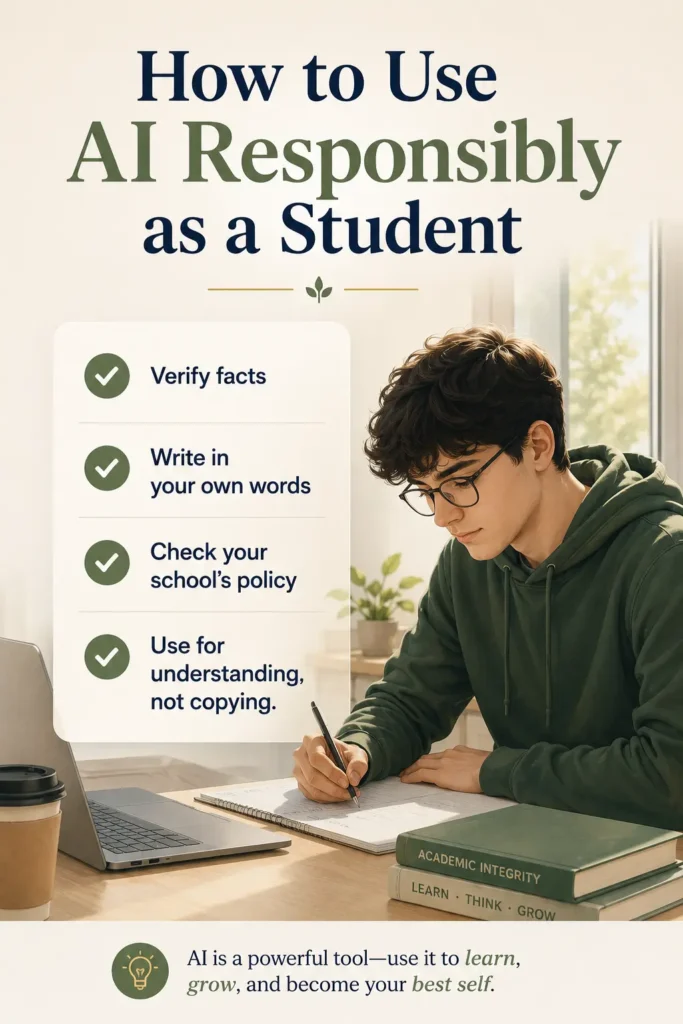
Before diving into any tool review, this section deserves your full attention. AI tools are powerful, but the way you use them will either strengthen or weaken your education.
AI as a Learning Partner, Not a Ghostwriter
The most important mindset shift is this: AI tools work best when they help you understand something, not when they do your thinking for you. Asking ChatGPT to explain the difference between correlation and causation so you can write about it in your own words is a legitimate learning strategy. Pasting that explanation directly into your essay without attribution is academic dishonesty — and it also means you haven’t actually learned anything.
Think of AI the same way you’d think of a very knowledgeable study partner. A good study partner helps you work through problems, suggests sources, points out gaps in your argument, and gives feedback on drafts. They don’t write your paper for you.
Academic Integrity Comes First
Most universities and schools now have clear AI use policies. Some allow AI assistance for brainstorming and editing; others prohibit it for assessed work entirely. Before using any AI tool on academic assignments, check your institution’s policy. If you’re unsure, ask your instructor. Ignorance of the rules is rarely a valid defense if a submission is flagged.
The MIT Academic Integrity Handbook and similar institutional guides provide solid frameworks for understanding where the line sits between legitimate tool use and academic misconduct.
Always Fact-Check AI Outputs
AI language models can produce confident-sounding responses that contain factual errors, outdated statistics, or outright fabrications — a phenomenon known as “hallucination.” If an AI tool tells you that a study was conducted by a particular researcher, verify it independently before including it in your work. Never cite AI-generated claims without checking a primary source.
Use AI for Understanding, Not Copying
When you use an AI tool to summarize a research paper, do so to get oriented before reading the full paper — not as a replacement for reading it. When you use a writing assistant to polish a paragraph, make sure the ideas in that paragraph are genuinely yours. The goal is to arrive at deeper understanding faster, not to produce output without understanding.
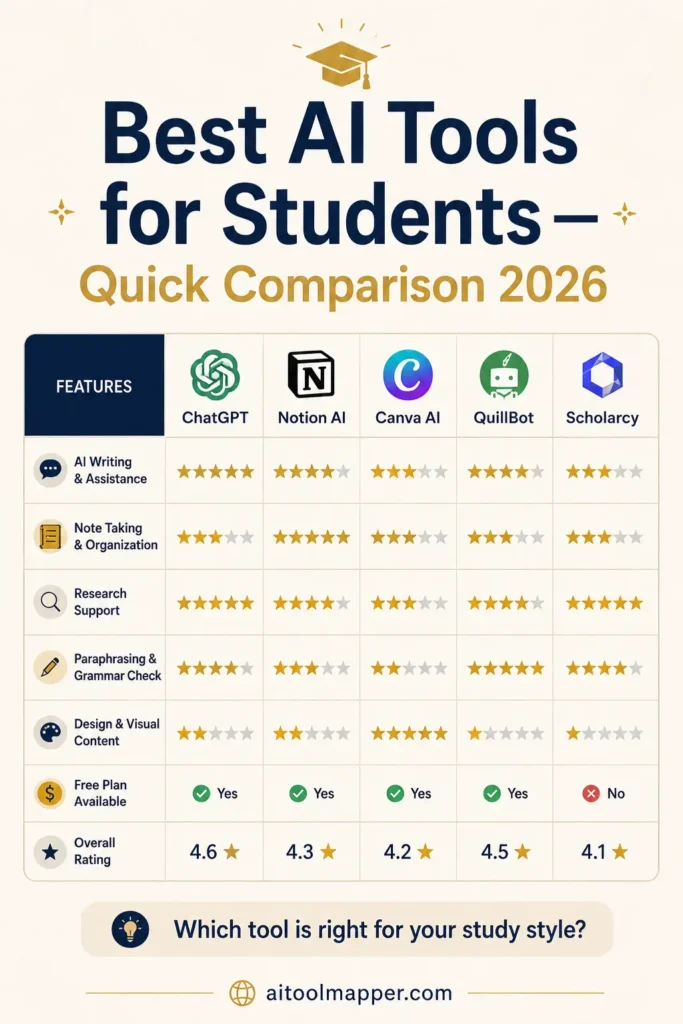
Quick Comparison Table
| Tool | Best For | Free Plan | Ease of Use | Ideal Student Type |
| ChatGPT | Explanations, brainstorming, writing | Yes (GPT-4o mini) | ★★★★★ | All students |
| Google Gemini | Research, information gathering | Yes | ★★★★★ | All students |
| Perplexity AI | Source-backed research | Yes | ★★★★☆ | Research-focused |
| Grammarly | Grammar, academic writing | Yes | ★★★★★ | Essay writers |
| Notion AI | Notes, project planning | Yes (limited) | ★★★★☆ | Organized learners |
| QuillBot | Paraphrasing, draft clarity | Yes (limited) | ★★★★☆ | Writers, ESL students |
| Otter.ai | Lecture transcription | Yes (limited) | ★★★★☆ | Lecture-heavy courses |
| Elicit | Academic literature search | Yes | ★★★☆☆ | Graduate, research students |
| Scholarcy | Paper summarization | Yes (limited) | ★★★★☆ | STEM, research students |
| Canva Magic Studio | Presentations, visual projects | Yes | ★★★★★ | Visual and creative learners |

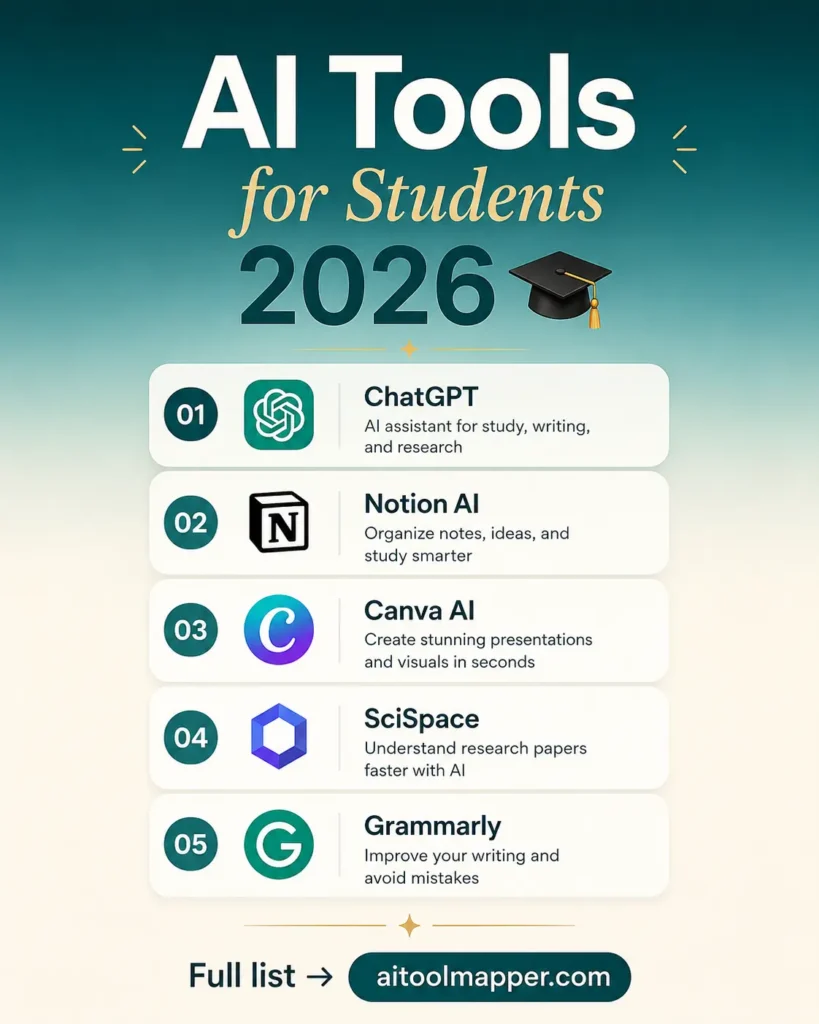
Top 10 AI Tools for Students in 2026
Tool #1 – ChatGPT
Best For: Understanding concepts, homework explanations, brainstorming ideas, drafting outlines, learning through conversation
Overview
ChatGPT, developed by OpenAI, remains the most widely recognized AI assistant in education as of 2026. It operates as a conversational AI that can explain complex topics, answer follow-up questions, help with writing structure, generate study outlines, and walk students through problem-solving steps across virtually every subject.
The platform has matured significantly since its initial release. The free tier now includes access to GPT-4o mini, which handles most student tasks competently. ChatGPT Plus subscribers get access to the more powerful GPT-4o model along with capabilities like image analysis, web browsing, and file uploads — features that expand its academic usefulness considerably.
Best Features
- Concept explanation on demand: Ask ChatGPT to explain any topic at any level — “explain photosynthesis like I’m in high school” versus “give me a graduate-level overview of photosynthesis regulation.” The ability to calibrate explanations to your knowledge level is genuinely useful for self-directed study.
- Socratic tutoring mode: Rather than just giving answers, you can prompt ChatGPT to guide you through problems step by step, asking questions that help you arrive at the answer yourself.
- Outline and structure generation: Struggling to organize a complex essay? ChatGPT can draft an outline based on your thesis and key points, which you then develop in your own words.
- Brainstorming support: For creative projects, research questions, or assignment topics, ChatGPT generates multiple angles quickly.
- Math and science problem walkthrough: While it makes errors (verify all solutions independently), its step-by-step breakdowns of math, chemistry, and physics problems help students understand methodology.
Pros
- Covers virtually every subject area
- Highly responsive and easy to use conversationally
- Free tier is functional for most student needs
- Supports follow-up questions and iterative learning
- Can analyze uploaded documents on paid plans
Cons
- Prone to “hallucinations” — presents incorrect information with confidence
- Does not reliably cite sources on the free tier
- Can tempt students toward over-reliance if not used thoughtfully
- Responses can be verbose and require critical reading
- Free tier has usage limits during peak hours
Best For
All student types, particularly those who need concept explanations, help structuring their thinking, or a patient tutor available at any hour.
Pricing Overview
- Free: GPT-4o mini access, basic features
- ChatGPT Plus: $20/month — GPT-4o access, browsing, file uploads
- ChatGPT Edu: Institutional pricing for universities
Real Student Use Case
Maria is a second-year psychology student struggling with her first academic research paper. She uses ChatGPT to explain the difference between longitudinal and cross-sectional study designs — a concept she couldn’t grasp from the textbook alone. The conversation format lets her ask follow-up questions until it clicks. She then writes the relevant section of her paper herself, using her own understanding. She does not copy ChatGPT’s explanation verbatim.
Responsible Use Reminder: Always verify factual claims from ChatGPT against peer-reviewed sources before including them in academic work. Treat it as a tutor, not a citable reference.
Tool #2 – Google Gemini
Best For: Research support, real-time information, study planning, integrating with Google Workspace
Overview
Google Gemini is Google’s flagship AI assistant, deeply integrated with the Google ecosystem that most students already use — Google Docs, Slides, Drive, and Search. In 2026, Gemini has become particularly useful for students who do a lot of their academic work within Google’s suite of tools, since it can assist directly within those applications.
Gemini’s key differentiator is its connection to current information through Google Search, making it more reliable for recent events, current statistics, and up-to-date research context than standalone language models. Google’s AI in Education initiative has also made Gemini features available through Google Workspace for Education, which many schools already license.
Best Features
- Real-time search integration: Unlike purely offline models, Gemini can pull current information from the web, making it more reliable for recent data points.
- Google Docs integration: Gemini can assist with writing, summarizing, and editing directly inside Google Docs — eliminating copy-paste friction.
- Multimodal inputs: Accepts text, images, and documents, which is useful for analyzing charts, diagrams, or scanned materials.
- Study assistance: Explain topics, generate quiz questions, or create study notes from pasted text.
Pros
- Free tier is generous and accessible
- Tightly integrated with Google Workspace
- Better at current/real-world information than offline models
- Available on mobile with strong performance
Cons
- Can still produce inaccurate information — verify claims
- Less specialized for academic workflows than some alternatives
- Advanced features tied to Google One AI Premium subscription
Best For
Students already using Google Workspace who want an AI assistant embedded in their existing workflow, and anyone needing AI help with current events or recent research context.
Pricing Overview
- Free: Gemini 1.5 Flash access via web and mobile
- Google One AI Premium: $19.99/month — Gemini 1.5 Pro, Workspace integration
Real Student Use Case
James is working on a current events analysis assignment about AI regulation in Europe. He uses Gemini to gather background context, understand recent legislative developments, and organize his initial notes inside a Google Doc. He then conducts independent verification of all cited facts before submitting.
Tool #3 – Perplexity AI
Best For: Research, source-backed answers, academic exploration, fact-checking
Overview
Perplexity AI operates as an AI-powered research engine — it combines a large language model with real-time web search and, critically, provides citations for every substantive claim it makes. For students who need to find information quickly while maintaining a traceable source trail, Perplexity is one of the most practically useful tools available.
Where ChatGPT primarily generates responses from training data, Perplexity retrieves and synthesizes current information from the web, presenting it with numbered source citations that you can click through and verify. This makes it genuinely better for academic research than general conversational AI.
As noted by MIT Technology Review’s analysis of AI search tools, source-grounded AI assistants represent a significant step toward more trustworthy AI-assisted research workflows.
Best Features
- Inline citations: Every response includes numbered sources you can click, making fact-checking significantly easier than with citation-free AI tools.
- Academic paper search: Pro subscribers can access academic sources via integrations with research databases.
- Follow-up conversation: Ask follow-up questions that build on the previous answer, gradually narrowing in on your research question.
- Focused search modes: Switch between web search, academic search, YouTube, and Reddit depending on what you’re looking for.
- Clean, structured outputs: Responses tend to be well-organized and appropriately concise compared to more verbose AI tools.
Pros
- Citations included by default — major advantage for research
- Pulls current information rather than relying solely on training data
- Fast and clean interface
- Free tier covers most basic research needs
Cons
- Sources are not always peer-reviewed — requires additional verification
- Less conversational and explanatory than ChatGPT for concept learning
- Pro plan required for deeper academic database access
Best For
Students conducting research, building literature reviews, fact-checking claims, or needing a reliable starting point for any paper or project.
Pricing Overview
- Free: Standard web search with citations
- Perplexity Pro: $20/month — unlimited pro searches, academic source access
Real Student Use Case
Amara is writing a literature review on climate change mitigation strategies. She uses Perplexity AI to quickly surface recent studies, government reports, and expert analyses with citations, giving her a verified reading list to work through in depth rather than spending hours searching databases manually.
Tool #4 – Grammarly
Best For: Grammar correction, academic writing clarity, essay polishing, ESL students
Overview
Grammarly is the most widely used AI writing assistant among students globally, and for good reason. It goes well beyond basic spellcheck — its AI-powered engine analyzes sentence structure, tone, clarity, conciseness, and grammatical correctness in real time, providing actionable suggestions as you type.
The tool integrates with Google Docs, Microsoft Word, and virtually every browser-based writing environment, making it frictionless to use across all academic writing contexts. Grammarly’s tone detection and goal-setting features are especially useful for students who struggle to match the formal, objective tone expected in academic papers.
Best Features
- Real-time grammar and style suggestions: Catches errors most basic spellcheckers miss, including comma splices, misplaced modifiers, and subject-verb disagreement.
- Clarity rewrites: Suggests clearer versions of convoluted sentences without changing your meaning.
- Tone detection: Flags when your writing sounds too casual, too aggressive, or inconsistent with your stated audience.
- Plagiarism checker: The premium plan includes a plagiarism detection tool that checks your writing against billions of web pages — useful for self-checking before submission.
- Writing goals: Set your audience, formality level, domain (academic, technical, etc.), and intent so suggestions are appropriately calibrated.
Pros
- Integrates seamlessly with most writing platforms
- Genuinely improves writing quality over time
- Extremely easy to use — no learning curve
- Free tier catches the most common errors
- Particularly helpful for non-native English speakers
Cons
- Premium features (plagiarism checker, advanced suggestions) require paid plan
- Occasionally suggests changes that alter your intended meaning — review carefully
- Not a substitute for developing strong writing skills independently
- Cannot assess the quality of your ideas, only the clarity of your expression
Best For
All students writing in English, especially ESL learners, students in writing-intensive majors, and anyone who wants real-time feedback during the drafting process.
Pricing Overview
- Free: Basic grammar and spelling correction
- Premium: ~$12/month (annual billing) — full suggestions, plagiarism check, tone detection
- Grammarly for Students: Discounted plans often available through university partnerships
Real Student Use Case
Priya is an international student from India writing her first English-medium economics essay. She uses Grammarly’s free tier to catch grammatical errors and sentence structure issues, and finds that the clarity suggestions help her understand why certain constructions are clearer — which gradually improves her writing without the tool.
Tool #5 – Notion AI
Best For: Note-taking, study planning, project organization, knowledge management
Overview
Notion is already one of the most popular productivity and note-taking platforms among students. Notion AI, the built-in AI layer, extends this with intelligent writing assistance, automatic summarization, task management, and database-powered study systems — all within a single, highly customizable workspace.
Unlike standalone AI chatbots, Notion AI operates within your notes and documents, meaning it can summarize your lecture notes, generate to-do lists from project briefs, draft study plans, or help you find information within your own workspace. This context-awareness makes it distinctly more useful for knowledge management than a general-purpose AI chat tool.
Best Features
- In-note summarization: Paste in lengthy lecture notes and ask Notion AI to summarize the key points, generate quiz questions, or create flashcard-style prompts.
- Action item extraction: After a project planning session, Notion AI can extract all the action items from your notes automatically.
- Study schedule generation: Describe your upcoming exam schedule and ask Notion AI to build a study timetable within your Notion calendar.
- Draft assistance: Start a project proposal or essay outline directly inside Notion, with AI helping to develop structure and fill in gaps.
- Q&A over your notes: Ask questions about content you’ve already saved in Notion — useful for reviewing before exams.
Pros
- Operates within your own notes — context-aware and personalized
- Extremely flexible for different organizational styles
- Good for long-term knowledge management across an entire degree
- Works well for group projects with shared workspaces
Cons
- Notion has a steeper learning curve than simpler note-taking apps
- AI features require a paid add-on ($8-10/month)
- Best value realized over time as your workspace grows
- Not ideal for students who prefer minimal digital tools
Best For
Self-organized students, project-heavy programs, students managing complex multi-subject workloads, and anyone building a long-term personal knowledge management system.
Pricing Overview
- Free: Core Notion workspace (no AI)
- Notion AI add-on: ~$8/month added to any plan
- Student discount: Free Plus plan available for students with .edu email
Real Student Use Case
David is a third-year engineering student managing four courses simultaneously. He uses Notion to organize all course notes in separate linked databases, and relies on Notion AI to summarize weekly lecture notes, generate problem practice sets, and maintain a rolling study schedule that updates as exam dates approach.
Tool #6 – QuillBot
Best For: Paraphrasing, improving draft clarity, academic rewriting, ESL writing support
Overview
QuillBot is an AI-powered paraphrasing and writing assistance tool that helps students rewrite sentences and paragraphs for clarity, conciseness, or variety. Its core paraphrasing engine offers multiple modes — Standard, Fluency, Formal, Expand, Shorten — letting students choose how they want their text restructured.
It’s important to be transparent about how QuillBot should and shouldn’t be used. The tool is most appropriately used to improve the clarity of writing you’ve already drafted in your own words — not to “spin” AI-generated or copied text into something that evades plagiarism detection. Academic integrity policies apply equally to paraphrased content that misrepresents the origin of ideas.
Best Features
- Multiple paraphrase modes: Switch between formal, fluent, creative, or shortened rewrites depending on context.
- Grammar checker: Catches errors similar to Grammarly’s free tier.
- Summarizer: Condenses long texts — useful for reviewing lengthy assigned readings.
- Citation generator: Automatically formats citations in APA, MLA, Chicago, and other styles from URLs or DOIs.
- Co-Writer: A distraction-free writing environment that integrates all QuillBot tools in one place.
Pros
- Excellent for improving sentence clarity and flow
- Citation generator saves significant formatting time
- Summarizer helps with dense reading materials
- Free tier offers substantial functionality
Cons
- Free tier limits paraphrase length per use
- Must be used ethically — not as a plagiarism evasion tool
- Paraphrasing suggestions occasionally distort meaning — always review
- Less comprehensive than Grammarly for full writing feedback
Best For
Students refining their own drafts for clarity, ESL students improving sentence structure, and anyone who needs quick citation formatting.
Pricing Overview
- Free: Limited paraphrasing, basic features
- Premium: ~$8.33/month (annual) — unlimited paraphrasing, all modes, plagiarism checker
Real Student Use Case
Carlos is a first-year marketing student who has written a paragraph in his essay but feels it reads awkwardly. He runs it through QuillBot’s Formal mode to see alternative phrasings, then selects the version that matches his intended meaning and sounds more academic — editing it further to match his own voice before including it.
Tool #7 – Otter.ai
Best For: Lecture transcription, meeting notes, audio study review
Overview
Otter.ai is an AI-powered transcription and note-taking tool that records and transcribes spoken audio in real time. For students who struggle to take comprehensive notes during fast-paced lectures, or who process information better by reviewing transcripts after class, Otter.ai is a genuinely practical solution.
The tool identifies different speakers, creates searchable transcripts, allows highlights and comments to be added, and can generate automated summaries of key discussion points. It integrates with Zoom and Microsoft Teams, which is essential for online and hybrid learners.
According to research on note-taking effectiveness from Cornell University, students who review lecture content shortly after class retain significantly more information. Otter.ai facilitates exactly that kind of timely review.
Best Features
- Real-time transcription: Transcribes lectures live as you listen, or processes recordings after the fact.
- Speaker identification: Labels different speakers in group discussions or seminars.
- Searchable transcripts: Full-text search across all your transcripts — find any topic mentioned in any lecture.
- Automated summaries: Otter Pilot generates meeting and lecture summaries with action items.
- Zoom/Teams integration: Joins meetings automatically and transcribes without manual setup.
Pros
- Reduces note-taking anxiety during dense lectures
- Makes lecture content reviewable and searchable
- Speaker identification useful for seminars and group work
- Mobile app works well for in-person classes
Cons
- Accuracy drops with strong accents, technical terminology, or background noise
- Free plan limits monthly transcription minutes
- Should supplement rather than replace active engagement during lectures
- Privacy considerations — check institution policies before recording lectures
Best For
Students in lecture-heavy programs, those who process information better through reading than listening, online learners on Zoom, and students with note-taking disabilities.
Pricing Overview
- Free: 300 transcription minutes/month, limited features
- Otter Pro: $10/month — 1,200 minutes/month, advanced summaries
- Otter Business: $20/month per user — for group/institutional use
Real Student Use Case
Sophie has ADHD and finds it difficult to both listen and take detailed notes simultaneously. She uses Otter.ai to capture full lecture transcripts, which she reviews with highlights the same evening — processing the content more effectively than she could during live note-taking alone.
Tool #8 – Elicit
Best For: Academic literature search, research paper discovery, systematic reviews
Overview
Elicit is an AI research assistant purpose-built for academic contexts. Rather than searching the open web, it searches databases of academic papers and helps you find, filter, and extract information from research literature. If you’re conducting a literature review, exploring a research question, or trying to understand what evidence exists on a specific topic, Elicit is meaningfully more useful than a general search engine.
Elicit’s paper extraction feature is particularly notable — it can pull specific data points from multiple papers simultaneously, creating structured summaries that make systematic literature reviews considerably faster. This is the kind of tool that would have taken graduate students weeks of manual work in previous generations.
Elicit was developed in collaboration with researchers and is used by thousands of academics and graduate students. Their approach to AI-assisted research focuses specifically on supporting rigorous, evidence-based thinking rather than shortcuts.
Best Features
- Literature search by research question: Enter a research question in natural language and Elicit finds the most relevant academic papers, ranked by relevance.
- Structured paper extraction: Automatically extracts sample sizes, methodologies, findings, and conclusions from multiple papers into a comparison table.
- Paper summarization: Generates concise summaries of individual papers with key findings highlighted.
- Evidence synthesis: Helps identify patterns, agreements, and contradictions across multiple sources.
- Citation export: Export citations in standard academic formats.
Pros
- Searches actual academic papers, not the open web
- Paper extraction dramatically accelerates literature reviews
- Well-suited for graduate-level and advanced research workflows
- Thoughtfully designed for rigorous academic use
Cons
- Less useful for undergraduate coursework that doesn’t involve research papers
- Steeper learning curve than general AI tools
- Coverage is not exhaustive — cross-reference with other databases like PubMed or Google Scholar
- Some features require paid plan
Best For
Graduate students, research assistants, final-year undergraduates writing dissertations, and anyone conducting a formal literature review.
Pricing Overview
- Free: Limited searches per month with basic features
- Elicit Plus: ~$12/month — unlimited searches, full extraction features
Real Student Use Case
Karim is writing his master’s dissertation on machine learning applications in clinical diagnostics. He uses Elicit to search for recent systematic reviews, extract study methodologies from multiple papers into a comparison table, and identify gaps in the existing literature — cutting the initial research phase of his dissertation from several weeks to a few focused sessions.
Tool #9 – Scholarcy
Best For: Summarizing academic papers, faster research comprehension, STEM research
Overview
Scholarcy is an AI-powered research summarization tool designed specifically for academic papers, textbook chapters, and research reports. It processes dense academic documents and generates structured flashcard-style summaries that highlight key concepts, study populations, data sources, methodologies, and main findings.
For students who need to process large volumes of academic literature — particularly in STEM, social sciences, and medicine — Scholarcy provides a way to quickly assess whether a paper is actually relevant to their research before investing time reading it fully. Think of it as an AI-powered abstract on steroids.
Best Features
- Structured summaries: Breaks papers into sections — background, key findings, study limitations, references — rather than producing undifferentiated text summaries.
- Reference extraction: Automatically generates a structured list of all cited references within a paper, which is invaluable for tracing the research trail.
- Concept highlighting: Identifies and defines key terms within the paper’s context.
- Comparison across papers: The library feature lets you build a collection of summarized papers and compare them.
- PDF and URL processing: Works with uploaded PDFs or direct links to papers.
Pros
- Well-suited for high paper volume research workflows
- Structured output format is cleaner than unstructured AI summaries
- Reference extraction is a genuine time-saver
- Purpose-built for academic content rather than general use
Cons
- Less effective on very long or complex theoretical papers
- Free plan limits the number of summaries
- Best used as a screening tool, not a replacement for reading key papers fully
- Less known among students — smaller community resources
Best For
Research-intensive students in STEM, social sciences, medicine, and law; final-year undergraduates, master’s, and doctoral students; anyone managing 20+ papers for a literature review.
Pricing Overview
- Free: Limited summaries per month
- Personal Plan: ~$9.99/month — unlimited summaries, full library features
Real Student Use Case
Fatima is a medical student preparing a systematic review on antibiotic resistance. With over 60 papers in her reading list, she uses Scholarcy to generate structured summaries of each, allowing her to quickly identify the 20 most relevant papers to read in full and extract the methodology data she needs for her comparative analysis.
Tool #10 – Canva Magic Studio
Best For: Presentations, visual projects, infographics, educational content creation
Overview
Canva Magic Studio is the AI-powered suite of tools built into Canva, the world’s most widely used visual design platform. For students who need to create presentations, posters, infographics, or any visual academic content, Canva Magic Studio dramatically reduces the time and design skill required to produce professional-quality visuals.
Magic Studio includes text-to-design generation, AI image creation, one-click background removal, smart resize for different formats, and an AI writing assistant integrated directly into design templates. For students who struggle with design — or simply don’t have time to spend hours in PowerPoint — Canva is a practical and accessible solution.
Best Features
- Text-to-presentation: Describe your topic and Canva generates a complete slide deck with structure, content, and design — which you then edit and refine.
- Magic Write: AI writing assistant embedded directly in designs for captions, slide copy, and description text.
- AI image generation: Create custom visuals for presentations without sourcing or purchasing stock photography.
- Smart resize: Instantly reformat a design for different dimensions — poster to social media post, for example.
- Educator and student templates: Thousands of academic-specific templates for presentations, study guides, and project boards.
Pros
- Highly accessible — no design experience required
- Generous free plan with strong functionality
- AI features accelerate the creation process significantly
- Strong template library for academic contexts
- Collaboration features work well for group projects
Cons
- AI-generated designs require significant editing to feel genuinely original
- Best AI features (Magic Studio) require Canva Pro
- Content quality depends on how much you customize beyond defaults
- Not suitable for data-heavy academic charts (use specialized tools instead)
Best For
Students who regularly create presentations, visual projects, posters, or educational content; group project teams; online course creators.
Pricing Overview
- Free: Access to thousands of templates, basic design tools
- Canva Pro: ~$15/month (or free for students/educators through Canva for Education) — full Magic Studio, premium templates, AI tools
Real Student Use Case
Lucas is presenting his environmental science research at a student symposium. Rather than spending three hours building slides in PowerPoint, he uses Canva’s AI-generated presentation template as a starting point, customizes the design to match his data visualizations, and uses Magic Write to draft concise slide captions — finishing a polished 20-slide deck in under 90 minutes.
Which AI Tool Is Best for Different Types of Students?
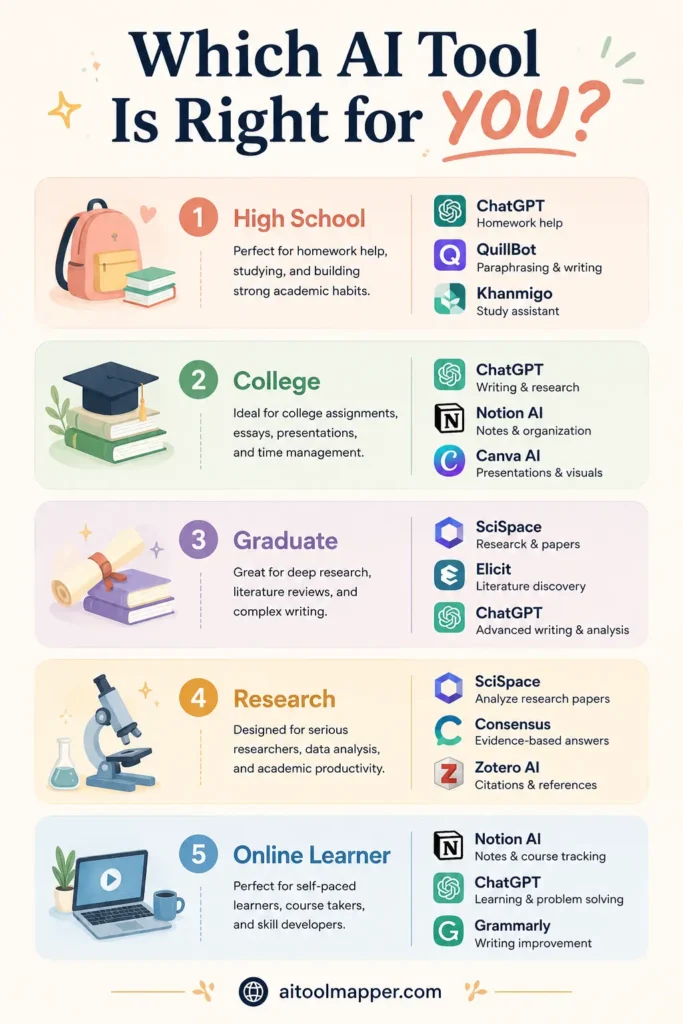
For High School Students
High school students are typically working on essays, research projects, and exam preparation. The priority is tools that are easy to use, support foundational writing skills, and don’t require institutional access.
Recommended: ChatGPT (concept explanations), Grammarly (essay writing), Canva Magic Studio (presentations), Perplexity AI (research with citations).
Avoid: Overdependence on paraphrasing tools like QuillBot, which can undermine the development of original writing skills at this stage.
For Undergraduate College Students
Undergraduates manage larger course loads, first independent research projects, and increasingly complex written assignments. The tools that help the most are those that support organization, writing quality, and efficient research.
Recommended: Notion AI (course organization), Grammarly (academic writing), Perplexity AI (research), Otter.ai (lecture notes), ChatGPT (concept learning).
For Graduate Students
Graduate students conduct original research, write theses, manage citation libraries, and engage deeply with academic literature. They need more specialized research tools.
Recommended: Elicit (literature search), Scholarcy (paper processing), Perplexity AI (source-backed research), Notion AI (dissertation management), Grammarly (thesis writing).
For Research Students (Doctoral/Postdoc)
At the research level, the premium is on working efficiently through large volumes of literature and managing complex, multi-year projects.
Recommended: Elicit (systematic reviews), Scholarcy (paper screening), Notion AI (research database), Perplexity AI (staying current with recent literature), Google Gemini (real-time research context).
For Online Learners
Online students often attend lectures asynchronously and may be managing coursework alongside full-time employment or other responsibilities. Efficiency and flexibility are paramount.
Recommended: Otter.ai (recorded lecture transcription), Notion AI (flexible study organization), ChatGPT (self-paced concept learning), Canva (digital project submissions), Google Gemini (integrated into Google Workspace courses).
Benefits of Using AI Tools for Students
Better Time Management
The most immediate benefit students report from using AI tools is time savings on specific, well-defined tasks. Generating a first draft outline, summarizing a long reading, or formatting citations — tasks that might have taken 30-60 minutes — can be completed in minutes. This frees up cognitive time for deeper work: critical analysis, original writing, and genuine learning.
A study by Stanford University’s Human-Computer Interaction group found that students who used AI writing assistance for structural tasks — outline generation, grammar checking — spent more total time on the substantive content of their work, not less.
Faster Research Discovery
Finding relevant academic sources has traditionally been time-consuming. AI tools like Perplexity AI and Elicit significantly accelerate the initial discovery phase, letting students identify the most relevant literature within an hour rather than a day. This doesn’t replace the careful reading that follows — but it means students spend more time engaging with genuinely relevant material.
Improved Writing Quality
Grammarly, QuillBot, and similar writing assistance tools provide feedback that helps students identify consistent patterns in their writing errors — not just fixing individual mistakes, but developing awareness over time. Students who use these tools critically, reading the explanations behind suggestions, genuinely improve their writing skills.
More Organized Notes
Tools like Notion AI and Otter.ai transform unstructured, scattered notes into searchable, organized knowledge bases. Students can find information from six months ago in seconds, link related concepts across courses, and build cumulative understanding rather than starting fresh each semester.
Productivity and Focus
By reducing friction on specific task types — formatting, transcription, basic research — AI tools reduce the mental overhead that often leads to procrastination. Students who know that building a slide deck won’t take three hours are more likely to start.
Limitations of AI Tools Students Should Know
Hallucinations and Factual Errors
The most serious limitation of AI language models is their tendency to generate plausible-sounding content that is factually incorrect. This is particularly dangerous in academic contexts where incorrect facts cited with confidence can damage a paper’s credibility. Always verify specific claims, statistics, dates, and citations from AI tools against primary sources.
Outdated Information
Many AI models have training data cutoffs and may not reflect the most current research, statistics, or events. For topics that evolve rapidly — AI itself, climate science, public health — always cross-reference with current sources.
Overdependence Risks
There is a real risk that heavy reliance on AI tools can slow the development of foundational skills. Students who always use AI to draft outlines may find they struggle to structure arguments independently in exams. Use AI as scaffolding that you progressively remove as your own skills develop.
Academic Policy Concerns
AI use policies vary significantly between institutions, departments, and individual courses. Some explicitly prohibit AI assistance on assessed work; others require disclosure; others are permissive. Not knowing your institution’s policy is not an excuse. Stay informed and ask instructors when in doubt.
Privacy Considerations
Be careful about what you share with AI tools. Do not paste personally identifiable information, confidential research data, or unpublished work into public AI platforms. Review each tool’s privacy policy and data retention practices before use. Many enterprise-grade tools offer data privacy guarantees that free consumer tools do not.
Learning Gaps
Perhaps the subtlest risk is this: if AI tools handle the challenging cognitive work — working through a difficult problem, crafting a nuanced argument, synthesizing conflicting sources — students may arrive at correct outputs without developing the underlying skills those tasks are designed to build. Use AI to support your learning, not to bypass it.
AI Study Workflow: How Students Can Combine Multiple Tools
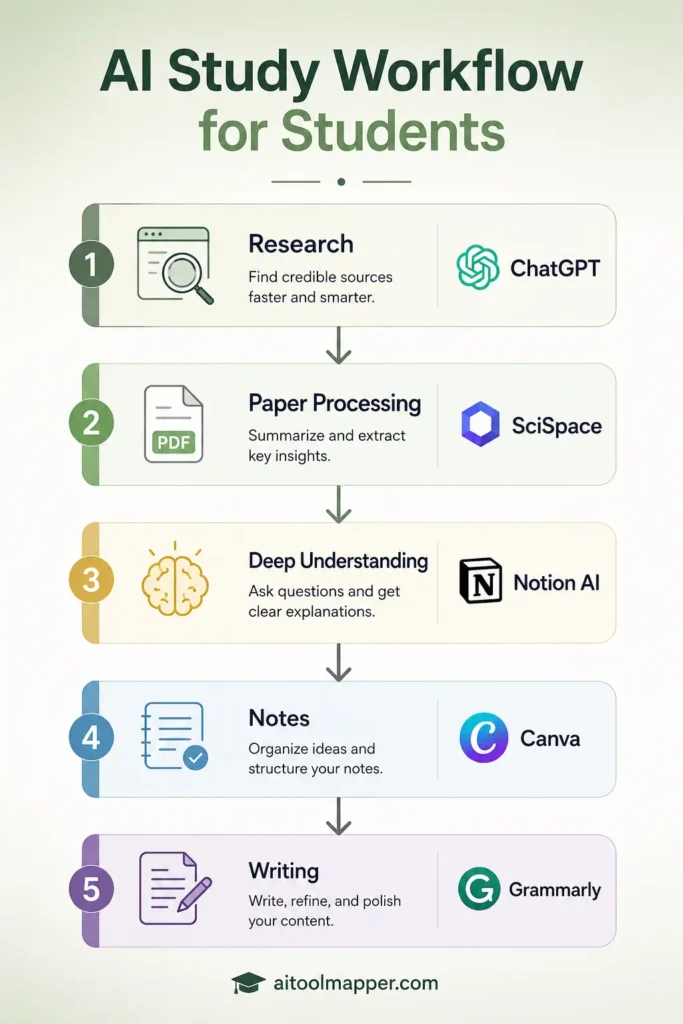
One of the most powerful ways to use AI tools is as part of a coordinated workflow rather than in isolation. Here’s a practical example for a typical undergraduate research paper.
Step 1: Research Discovery — Perplexity AI + Elicit
Start your research process with Perplexity AI for quick, source-grounded background context on your topic. For academic literature specifically, use Elicit to search for relevant peer-reviewed papers, filter by date and relevance, and create a structured reading list.
Time saved: 2-4 hours compared to manual database searching
Step 2: Literature Processing — Scholarcy
Upload your most relevant papers to Scholarcy for structured summaries. This helps you quickly identify which papers need full reading and which can be noted with key data points only.
Time saved: 1-3 hours of dense reading time
Step 3: Deep Understanding — ChatGPT
For concepts within your reading that you find difficult to understand, use ChatGPT in conversational tutoring mode to deepen your comprehension before writing. Asking “explain this concept to me and give me three practical examples” builds genuine understanding.
Step 4: Note Organization — Notion AI
As you read and learn, organize all your notes, quotes, source information, and insights inside Notion. Use Notion AI to summarize your notes into key thesis points and generate a structured paper outline.
Step 5: Writing and Editing — Grammarly + QuillBot
Write your first draft yourself — this is non-negotiable for academic integrity. Then use Grammarly for grammar and style feedback and QuillBot’s Formal mode to identify sentences that could be clearer, always editing suggestions to maintain your own voice.
Step 6: Presentation — Canva Magic Studio
If your assignment requires a presentation alongside the paper, use Canva to build a slide deck based on your finalized research findings, using Magic Write for concise slide captions.
This workflow uses AI at every stage to reduce friction on specific task types while keeping you — the student — as the intellectual author of your work.
AI in Education: Trends to Watch in 2026
Personalized Learning at Scale
The most significant shift happening in AI-powered education is personalization. Adaptive learning platforms analyze how individual students perform on different question types, identify gaps in understanding, and generate customized study pathways. What once required a private tutor is becoming accessible to any student with an internet connection.
Platforms like Khan Academy’s Khanmigo and emerging LMS integrations are already delivering early versions of this personalized experience, with more sophisticated implementations expected through 2026 and beyond.
AI Tutors Becoming Mainstream
The concept of an AI tutor that provides patient, infinitely available, personalized instruction is moving from research prototype toward mainstream adoption. Universities including Arizona State University, Georgia Tech, and MIT have piloted AI tutoring systems that handle student questions outside office hours, significantly reducing the pressure on human teaching assistants while improving student access to support.
Smarter Research Tools
Research AI tools are becoming more sophisticated in their ability to synthesize literature across large paper sets, identify contradictions between studies, and even generate hypotheses based on identified gaps in research. Tools like Elicit and Semantic Scholar continue to improve their academic database coverage and synthesis capabilities.
AI-Powered Note Taking
The integration of AI into note-taking will deepen significantly. Expect tools that not only transcribe lectures but also cross-reference transcribed content with your existing notes, flag concepts that connect to previous coursework, and generate study prompts from lecture content automatically.
Adaptive Assessment
AI-powered assessment tools are beginning to move beyond multiple-choice question generation to creating personalized problem sets, evaluating open-ended responses, and tracking concept mastery over time. This shifts assessment from snapshots to continuous measurement of learning progression.
Frequently Asked Questions
What is the best AI tool for students?
There isn’t a single best tool — it depends on what you need. For concept explanations and homework help, ChatGPT is the most versatile. For research with citations, Perplexity AI is outstanding. For writing quality, Grammarly is the most reliable. For comprehensive note organization, Notion AI is hard to beat. Most students benefit from using 2-3 tools together rather than one alone.
Are AI tools free for students?
Most tools covered in this article offer meaningful free tiers — ChatGPT, Google Gemini, Perplexity AI, Grammarly, and Canva all have free versions that cover the majority of student needs. Premium plans add more capability but aren’t required to get started. Canva Pro is available free for students and educators through Canva for Education, which is worth claiming immediately.
Can AI help with studying?
Yes, when used appropriately. AI tools can explain difficult concepts at your level, generate practice questions, help you organize notes into study guides, transcribe lectures for review, and provide writing feedback. The key is using these functions to deepen your understanding rather than to avoid engaging with the material.
Which AI tool is best for research?
Perplexity AI is the best general research tool because it provides source citations with every response. For academic paper research specifically, Elicit is more appropriate, as it searches peer-reviewed literature rather than the open web. For summarizing papers you’ve already found, Scholarcy is highly effective.
Is it okay to use AI for homework?
This depends entirely on your school’s or university’s policy and the nature of the assignment. Using AI to understand a concept and then completing work yourself is generally acceptable. Using AI to generate work you submit as your own is academic misconduct. Always check your institution’s AI policy and when uncertain, ask your instructor directly.
What AI tool helps with essays?
Grammarly is the most reliable tool for improving essay grammar, clarity, and style. For structural feedback and brainstorming, ChatGPT can help you develop your argument and suggest ways to strengthen it — as long as you do the actual writing yourself. QuillBot can help refine awkward sentences in your own draft.
Can AI replace studying?
No. AI tools can make certain parts of studying more efficient, but they cannot replace the cognitive work of actually learning — reading carefully, thinking critically, connecting ideas, practicing problems, and developing your own knowledge and skills. Students who use AI as a substitute for studying will find themselves poorly prepared for exams, group discussions, and professional situations where their knowledge is tested without AI assistance.
Which AI tool is best for note-taking?
Otter.ai is the best tool specifically for transcribing and organizing lecture notes. Notion AI is the best tool for organizing notes you’re actively building across multiple courses and time periods. For condensing notes into study summaries, ChatGPT and Notion AI both work well.
Conclusion
AI tools have genuinely changed what’s possible for students who use them thoughtfully. The ten tools covered in this guide — from ChatGPT’s conversational explanations to Elicit’s academic research capabilities — each address specific friction points in the student workflow. Used as a coordinated toolkit rather than individual shortcuts, they can meaningfully improve how you manage research, develop writing, organize knowledge, and prepare for assessments.
But the most important thing to take away from this guide isn’t which tool has the best feature set. It’s this: AI tools are most valuable when they help you learn more effectively, not when they reduce the amount of learning you actually do. The students who benefit most from these tools are the ones who remain intellectually engaged — using AI to understand more deeply, work more efficiently, and produce better original work, not to produce work without understanding.
Different students will need different combinations of these tools. A high school student writing essays benefits most from Grammarly and Perplexity AI. A graduate researcher conducting a systematic review gets the most value from Elicit and Scholarcy. An online learner juggling work and study finds Otter.ai and Notion AI transformative for managing information.
Start with one or two tools that address your most immediate pain points. Use them consistently, critically, and ethically. Over time, experiment with integrating more tools into your workflow as your needs evolve.
The future of education will involve AI — that’s no longer a prediction, it’s the present reality. The question is whether you’ll use it as a crutch or as a scaffold. Build your skills, maintain your integrity, and let AI help you study smarter.
To explore more AI tools by category and use case, visit AI Tool Mapper’s full tool directory — a curated, regularly updated catalog of AI tools across every professional and educational domain.
Additional Resources
- AI Tool Mapper Blog — AI Guides & Insights
- ChatGPT — OpenAI
- Perplexity AI — AI Tool Mapper Directory
- Canva — AI Tool Mapper Directory
- UNESCO Report: AI in Education
- EDUCAUSE Horizon Report: Teaching and Learning Edition
- MIT News: How Students Are Using AI Tools for Learning
- Cornell University: Note-Taking Strategies